

Essential Compliance Monitoring Strategies for Retail
US retailers operate in one of the most heavily regulated environments. Every store must stay aligned with labor laws, safety rules, payment-card standards, advertising guidelines, and data-privacy requirements.

And when compliance slips, the financial hit is immediate.
Do you know? The cost of non-compliance is 2.7x higher than the cost of staying compliant, once you factor in fines, legal fees, and operational disruption. Regulatory operating costs have also surged, rising over 60% in the past decade. These pressures land hard in retail specifically, where high turnover, multi-state operations, and manual store-level checks create major blind spots.
That makes strong compliance monitoring a strategic necessity, not a back-office task. This blog breaks down the most effective compliance monitoring strategies for retail and shows how automation helps keep every location consistent, accountable, and audit-ready.
At A Glance:
- Compliance can’t rely on checklists and memory: Retailers need automated systems that ensure nothing gets missed, especially across dozens of stores.
- Inconsistent processes are a hidden risk: When every store follows its own version of “compliance,” audit failures and regulatory fines are just a matter of time.
- Real-time visibility beats post-incident reporting: Dashboards that show what’s overdue, unresolved, or slipping through the cracks help you act before things escalate.
- Incidents, tasks, and policies must be tracked: Without proof, completion means nothing. Retailers need tools that show who did what, when, and why it matters.
- The right platform turns compliance from a burden into an advantage: With VComply, retailers don’t just stay compliant. They run tighter, safer, more accountable operations.
What Is Retail Compliance Monitoring?
Retail compliance monitoring is the ongoing process of verifying whether your stores, employees, and daily operations adhere to required laws, internal policies, and industry standards. It ensures that every location follows the same rules consistently, without gaps.
In the retail world, compliance monitoring touches almost every part of the business. It includes:
- How employees clock in and out
- How products are labeled
- How customer data is handled
- How payments are processed
- How store incidents are documented.
When these activities aren’t monitored regularly, issues slip through and escalate quickly.
Effective monitoring gives retailers three things they often lack: visibility, consistency, and accountability. With these, retail leaders can spot red flags early, maintain audit readiness, and reduce operational and financial risk.
Key Regulations Retailers Must Monitor
Retailers in the U.S. operate under a mix of federal, state, and industry-specific rules. These requirements protect customers, employees, payment data, and in-store operations.
It’s essential to understand why they matter: every rule is directly tied to safety, fairness, or trust. Missing even one requirement can lead to fines, lawsuits, and failed audits.
Here are the key regulations retailers must monitor across all locations:
1. OSHA (Occupational Safety and Health Administration)
Retailers must maintain safe stores, such as clear walkways, proper equipment use, and accurate incident reporting. OSHA fines can escalate rapidly when safety hazards are left unchecked.
2. ADA (Americans with Disabilities Act)
Stores must remain accessible to all customers. That includes signage, aisle width, checkout design, and accommodation for employees with disabilities.
3. FTC Rules and Consumer Protection Laws
The FTC oversees the accuracy of advertising, pricing practices, promotional claims, and the fair treatment of customers. Even small labeling or pricing errors can create compliance issues.
4. PCI DSS (Payment Card Industry Data Security Standard)
Any retailer accepting credit or debit cards must protect cardholder data. PCI DSS violations can result in penalties from payment processors and major reputational damage.
5. State Labor Laws
Retailers must track overtime, breaks, scheduling rules, and pay transparency. Requirements vary by state, making multi-state operations more complex.
6. Data Privacy Requirements (Including CCPA for California)
Retailers handling customer data must adhere to privacy rules regarding data collection, storage, and disclosure.
7. FDA Regulations (If Applicable)
Retailers selling food, supplements, or over-the-counter products must follow labeling and safety rules enforced by the FDA.
These regulations shape store operations every day. Monitoring them consistently is essential for maintaining compliant, protected, and audit-ready locations.
The Biggest Compliance Challenges for Retailers
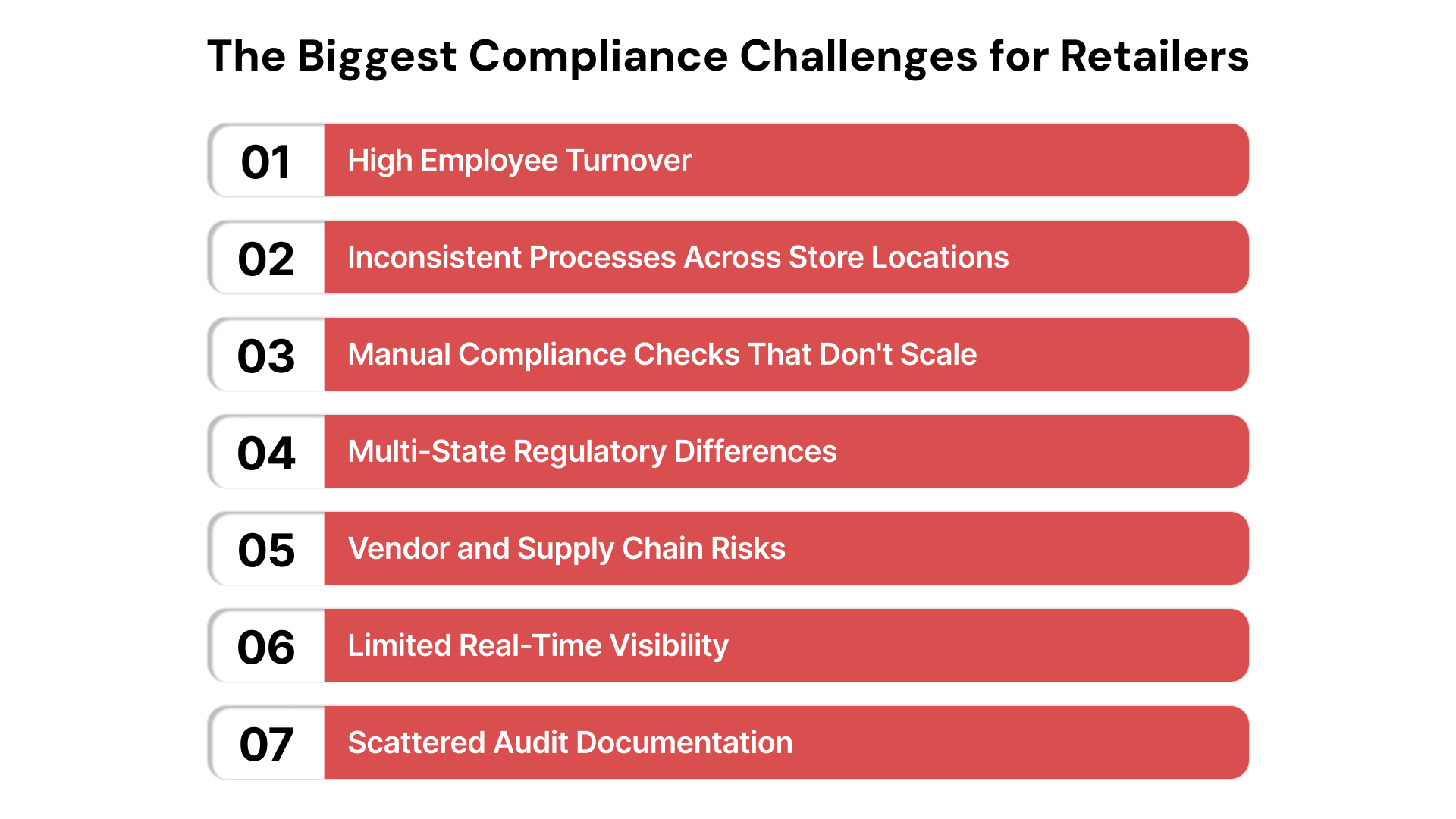
Retailers face unique compliance pressures stemming from fast-paced operations, high employee turnover, and multi-location complexity. Before addressing specific strategies, it’s important to understand the challenges that make compliance monitoring difficult in the first place.
- High Employee Turnover
Retail has one of the highest turnover rates in the U.S., which makes consistent training and policy awareness difficult. New employees often begin their roles before fully understanding the compliance expectations.
- Inconsistent Processes Across Store Locations
Two stores of the same brand can operate very differently. Minor deviations, such as how incidents are recorded, how stock is handled, and how safety checks are performed, create compliance gaps.
- Manual Compliance Checks That Don’t Scale
Spreadsheets, email reminders, and paper checklists lead to missed tasks, incomplete records, and limited visibility. Manual processes also make it more challenging to remain audit-ready.
- Multi-State Regulatory Differences
Retailers operating across multiple states must comply with varying labor laws, scheduling rules, and consumer protection standards. Tracking these manually increases the risk of non-compliance.
- Vendor and Supply Chain Risks
Retailers depend on third parties for products, logistics, and services. If a vendor fails to meet safety, labeling, or data security requirements, the compliance fallout often falls on the retailer.
- Limited Real-Time Visibility
Without dashboards or centralized monitoring, compliance leaders can’t see which stores are falling behind until it’s too late. This creates blind spots that lead to audit findings.
- Scattered Audit Documentation
Evidence for inspections, safety checks, and policy compliance often lives in emails, personal folders, or outdated systems. This makes audits stressful, time-consuming, and prone to errors.
These challenges make clear why retailers need structured, proactive compliance monitoring, not reactive fire drills.
If inconsistent processes across locations create audit gaps, automate your store routines with ComplianceOps. Standardize safety inspections, documentation reviews, and regulatory tasks across every store without relying on manual checklists.
Next, let’s break down strategies that help address these gaps and build consistency across all stores.
Essential Compliance Monitoring Strategies for Retail
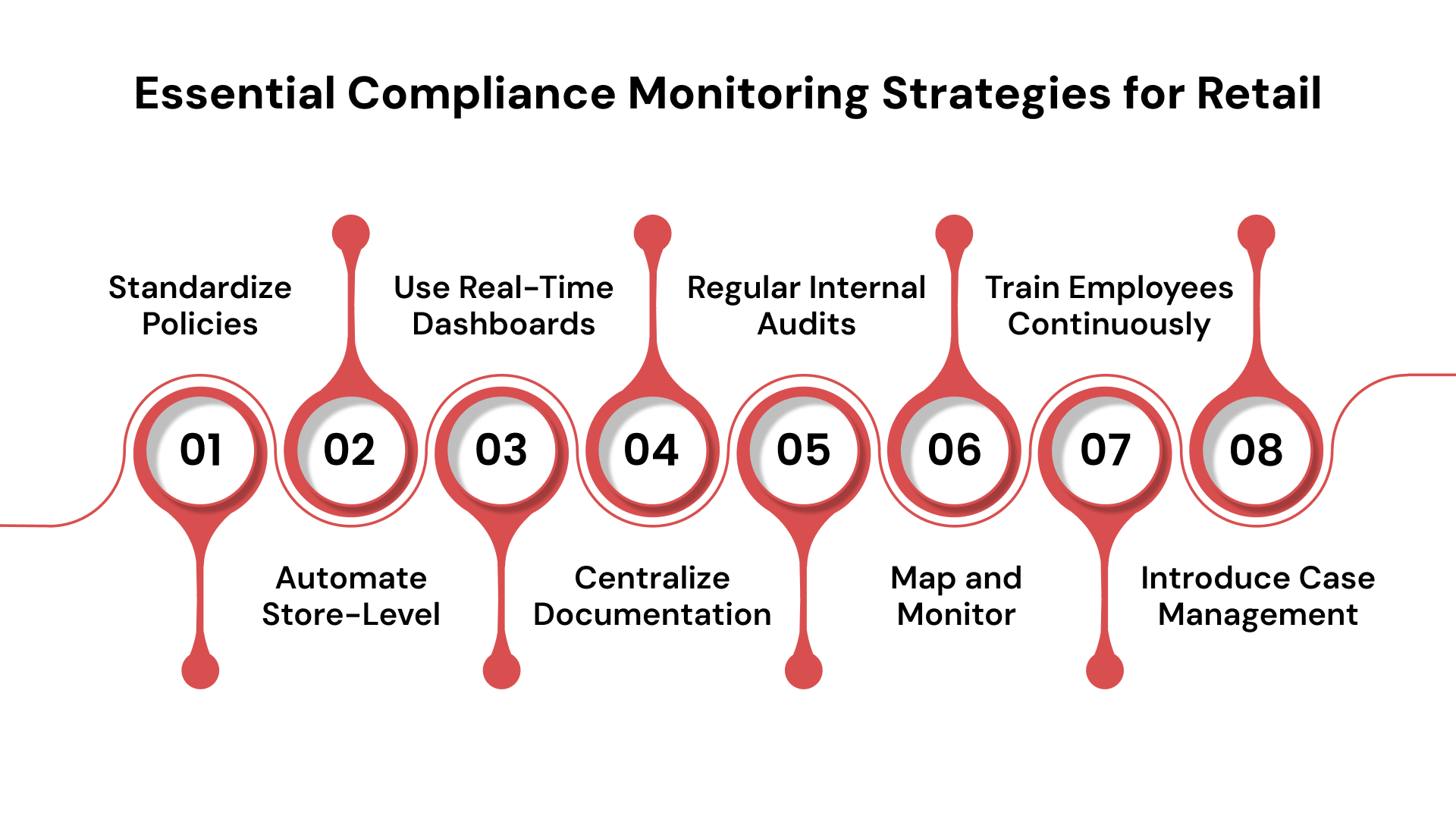
Monitoring compliance isn’t just checking boxes but building repeatable systems that alert you before problems hit. With the global store compliance monitoring market estimated at USD 2.47 billion and growing at a 10.6% CAGR, it’s clear that retailers are investing in solutions that scale across locations.
Here are eight strategies that deliver real results across retail chains:
Standardize Policies Across All Locations
Without consistent policy definitions, store teams often interpret rules differently, resulting in disparate practices.
Develop a master policy document covering safety, labor, payment, and incident-reporting standards. Publish it to every store portal, require acknowledgment, and update it quarterly. This provides compliance officers with a single source of truth, ensuring that every location uses the same baseline.
Automate Store-Level Compliance Checks
Manual checklists are missed, late, or incomplete. That’s a major gap when stores span dozens or hundreds of locations.
Schedule automated tasks for each store (e.g., equipment inspection every Monday, safety walk every quarter). Use cloud-based workflows that log completion with timestamps and digital signatures. That way, audits can pull full histories rather than rely on memory or paper forms.
Use Real-Time Dashboards
Many retailers only find out that a store is non-compliant when an audit is conducted. That’s far too late.
Set up dashboards for compliance readiness. Display metrics like percentage of overdue tasks, number of unresolved incidents, and regional store comparisons. Allow senior leadership to view store performance at a glance and trigger alerts when thresholds are breached (e.g., more than 10% of tasks are overdue).
Centralize Documentation
When documents reside on multiple servers, laptops, or local folders, auditing becomes chaotic and time-consuming.
Create a centralized document repository for all stores. Every inspection, report, certificate, or vendor document is uploaded to standardized folders with metadata (store ID, date, category). During audits, you can filter by store, date, or compliance domain and present reports within minutes.
Implement Regular Internal Audits
Self-checks uncover issues before external regulators do, helping to build a culture of accountability.
Build an internal audit calendar that covers every store every 6–12 months. Use a standardized audit checklist aligned with policies and regulations. After each audit, publish the results and key findings to store managers and regional directors, with corrective actions tracked until they are closed.
Map and Monitor Retail Risk Areas
Retailers face unique risks, including inventory shrinkage, data breaches, vendor non-compliance, and store safety concerns. Recognizing those risks upfront allows focused monitoring.
Conduct a risk-mapping workshop. Identify the top 5 retail risks (for example: payment security, employee scheduling violations, store safety incidents, product mislabeling, supply-chain vendor compliance).
Assign each risk a designated owner and define risk indicators (e.g., the number of payment exceptions and safety incidents per 1,000 hours). Track them monthly in your dashboards.
Train Employees Continuously
High employee turnover in retail means compliance training must be continuous—not just a one-time event.
Automate training assignments for new hires, seasonal workers, and existing staff when policies or regulations change. Track completion rates at the store, region, and national level. Link training compliance to performance reviews. When a store falls below 90% completion, trigger a manager alert.
Introduce Case Management
Incidents happen – safety mishaps, customer data breaches, in-store theft. But if they’re not tracked, monitored, and resolved consistently, they create liability.
Use a case-management workflow: incident reported → investigation initiated → root cause identified → corrective action assigned → resolution verified. Maintain an incident log for each store and region. During reviews or audits, you can show how quickly incidents were resolved and what systemic changes were made.
To make the complete process easier, convert these critical retail checklists into automated workflows. See how CaseOps eliminates missed steps and provides reliable proof for every action.
How Automated Tools Strengthen Compliance Monitoring in Retail?
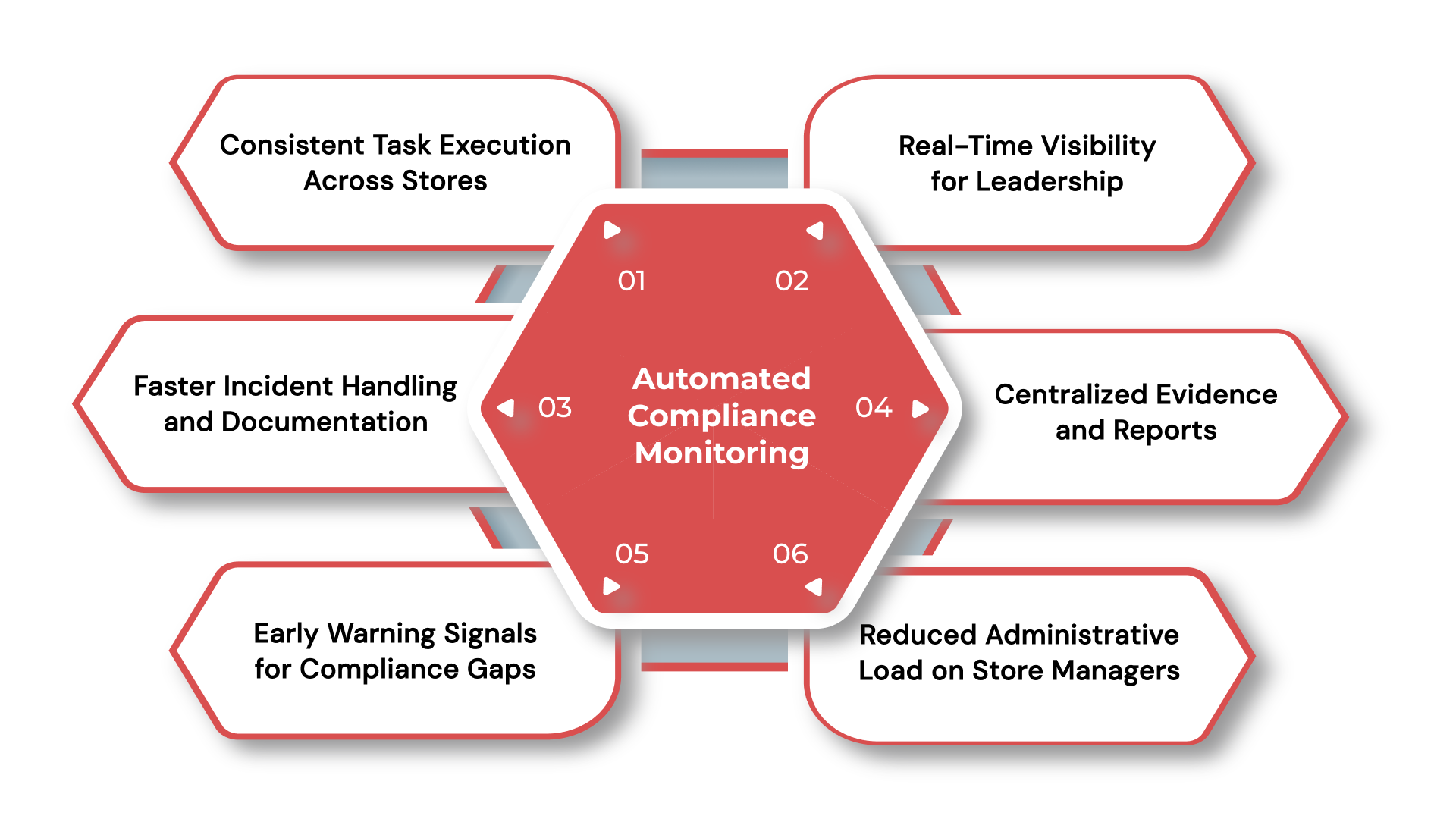
Compliance monitoring becomes harder to manage as retail operations expand. More stores mean more tasks, more records, and more room for things to fall through the cracks. That’s why retailers are turning to automation.
Automation doesn’t replace people; it provides teams with the structure and oversight they can’t achieve with spreadsheets or paper-based workflows.
Here’s how automated tools make retail compliance monitoring stronger:
- Consistent Task Execution Across Stores
Automation ensures store teams complete the same activities on the same schedule, whether it’s a weekly safety inspection or a quarterly audit checklist. This removes inconsistencies that come from human oversight or local store habits.
- Real-Time Visibility for Leadership
Automated tools provide dashboards that show which stores are compliant, which tasks are overdue, and where issues tend to recur. Regional leaders get a clear picture of performance without waiting for manual updates.
- Faster Incident Handling and Documentation
Instead of chasing down emails or paper reports, automated workflows capture incidents immediately and route them to the right person. Every action is timestamped, which strengthens audit trails and speeds up resolution.
- Centralized Evidence and Reports
Automation collects and stores compliance proof in one cloud location. During audits, teams can instantly pull complete evidence packages instead of scrambling through folders or inboxes.
- Early Warning Signals for Compliance Gaps
Automated alerts tell managers when tasks are overdue, incidents are piling up, or a store’s performance drops below a threshold. Retail leaders can act before issues impact audits or customer safety.
- Reduced Administrative Load on Store Managers
Automation eliminates the repetitive admin tasks that pull managers away from customers and daily operations. This leads to better store performance and fewer compliance-related errors.
In this way, retailers free up their teams, increase accuracy, and significantly reduce the risk of non-compliance.
Also Read: The Best Retail Compliance Software for 2025
Best Practices for Maintaining Strong Retail Compliance Long Term
Building a solid compliance program is one thing. Keeping it consistent across every store, every month, is another. Long-term compliance depends on habits, structure, and continuous oversight.
These best practices help retailers stay compliant as operations grow or regulations change.
1. Review Compliance Data Regularly
Compliance performance shouldn’t be reviewed only before audits. Set a monthly or quarterly cadence to analyze trends, spot recurring issues, and compare store performance. Data-driven reviews help identify patterns, such as stores with repeated safety findings or inconsistent task completion.
2. Keep Policies Updated as Regulations Evolve
Regulatory changes, from labor laws to data privacy rules, can shift quickly. Establish a policy review cycle and update store teams proactively to ensure ongoing effectiveness. Even small rule changes can impact scheduling, training, or handling of customer data.
3. Compare Stores to Identify Gaps and Outliers
Benchmarking helps determine which stores adhere closely to standards and which require additional support. Comparing stores also reveals issues specific to regions, leadership styles, or store formats.
4. Build a Culture of Compliance, Not Just Checklists
Employees are more likely to follow procedures when compliance feels like part of everyday operations, not an extra task. Reinforce expectations in team meetings, reward consistency, and publicly highlight improvements to maintain visibility of compliance.
5. Conduct Periodic Compliance Readiness Assessments
In addition to internal audits, run structured readiness checks that simulate real audit conditions. These assessments help store teams identify missing documentation, outdated processes, or weak controls before an external review finds them.
6. Strengthen Vendor Oversight
Retailers rely heavily on suppliers, cleaning services, product manufacturers, and logistics partners. Review vendor certifications, agreements, and performance regularly. A vendor compliance lapse often becomes the retailer’s problem.
These best practices help retailers maintain compliance standards and build operational consistency that withstands internal and external audits.
Also Read: How to Assess Compliance: 6 Steps to Take Today
How VComply Strengthens Compliance Monitoring for Retail?
VComply brings automation, consistency, and audit-readiness into one secure GRC ecosystem. The platform replaces fragmented store-level processes with automated workflows, centralized documentation, and dashboards that reflect compliance performance across every location.
Below are the core VComply features that strengthen retail compliance monitoring:
- ComplianceOps: Standardizes and automates store-level compliance tasks. It includes safety inspections, break tracking reviews, PCI DSS checklists, equipment checks, and documentation updates.
- RiskOps: Provides an organized way to assess and monitor risks such as payment fraud, workforce violations, store safety issues, inventory irregularities, and vendor non-compliance.
- PolicyOps: Ensures that every policy stays consistent and accessible, and that all employees review and acknowledge updates.
- CaseOps: Centralizes incident reporting and assigns clear ownership for investigations and resolutions. Every incident becomes traceable, accountable, and audit-ready.
- Automated Reporting & Analytics: Retail compliance requires constant visibility. VComply automatically generates dashboards and reports that show how every store is performing against compliance standards.
Ready to strengthen retail compliance monitoring? See how ComplianceOps helps retail teams automate compliance tasks and stay audit-ready across every store.
Start your 21-day free trial today!
Wrapping Up
As retailers manage tighter labor rules, stricter payment-security demands, and rising safety expectations, the volume of compliance activities has outgrown what manual tracking can handle. Automation now plays a central role in keeping every store aligned, audit-ready, and free from preventable risk.
But technology alone isn’t enough. The strongest retail compliance programs combine automated oversight with store-level accountability – ensuring that policies are understood, tasks are completed on time, and incidents are handled consistently.
Strengthen your retail compliance monitoring with VComply. Start a free trial today and see how automation helps your stores stay compliant, consistent, and confidently prepared for every audit.
FAQs
Use a cloud-based platform that gives you real-time visibility into every store’s compliance status. Look for tools that track completed tasks, flag overdue items, and centralize evidence even if you’re not directly managing the team.
Instead of calling out stores, use internal dashboards to show performance trends across all locations. This encourages healthy competition and accountability, while allowing you to step in constructively where support is needed.
Update policies whenever there’s a regulatory change, an audit finding, or an operational shift, ideally on a quarterly basis. Tools like PolicyOps make it easy to roll out changes to all stores and track who’s reviewed them.
Set up automated task assignments with deadlines and reminders to ensure timely completion. Managers won’t have to remember everything, and you’ll have a record of what was done (or missed) without needing to micromanage.
Use real-time dashboards that display task completion rates, incident resolution times, and audit logs. Tools like ComplianceOps and GRCOps enable you to generate exportable reports in minutes – no more scrambling through spreadsheets.