


ISO 37301 and Compliance Management Systems
For organizations looking for an internationally recognized framework, ISO 37301:2021 specifically addresses compliance management systems.
ISO describes ISO 37301 as an international standard that provides requirements and guidance for establishing, developing, implementing, evaluating, maintaining, and improving an effective and responsive compliance management system. The requirements are designed to apply across organizations of different types and sizes.
ISO 37301 treats compliance as a management discipline rather than a collection of isolated activities.
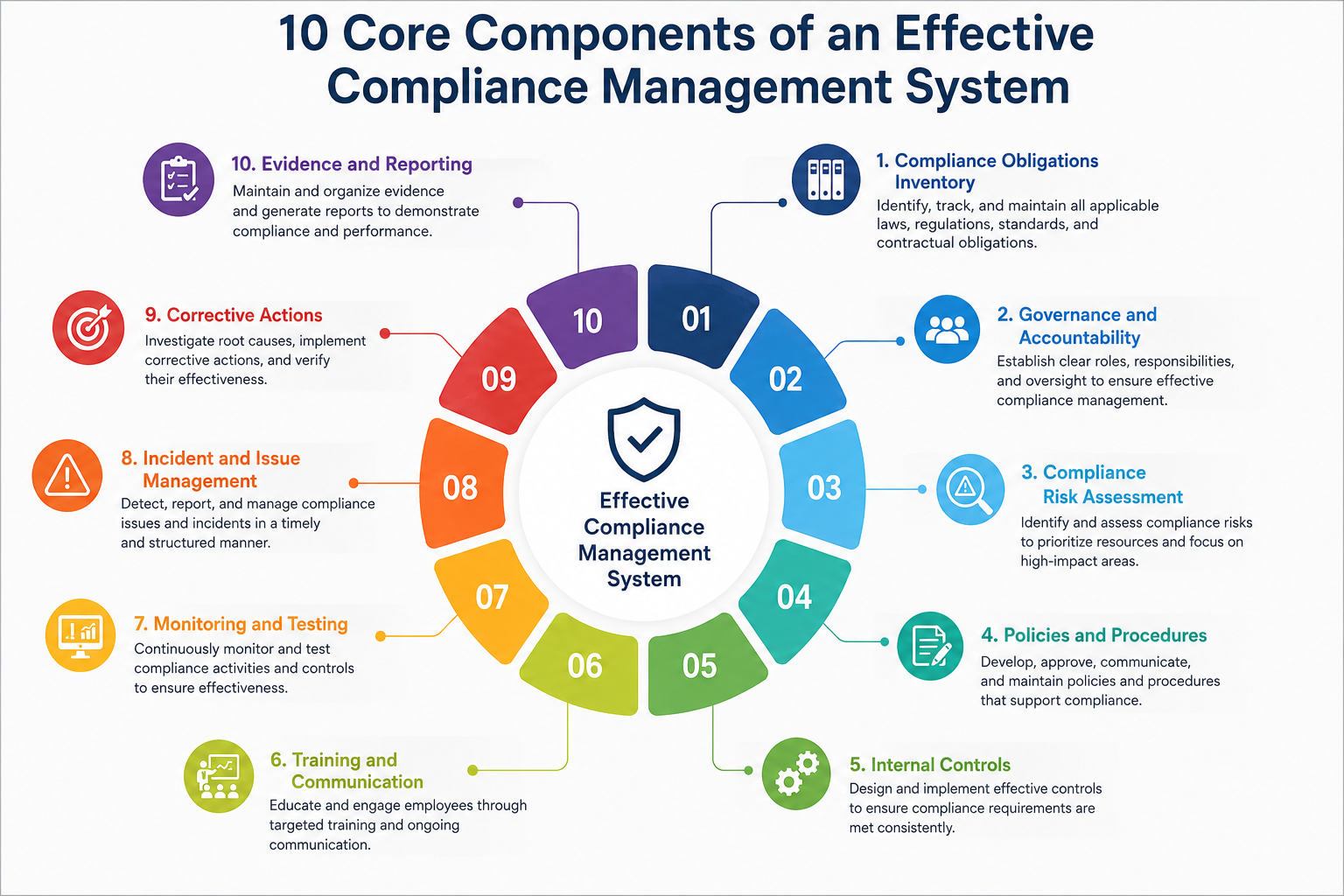
Its approach reinforces several areas that should already be familiar to organizations building a CMS: understanding organizational context, identifying compliance obligations, leadership commitment, assigning responsibility, assessing compliance risks, maintaining policies and processes, developing awareness, monitoring performance, conducting internal reviews, addressing nonconformities, and continually improving the system.
For organizations operating across several regulatory environments, ISO 37301 can provide a common management structure while individual regulatory frameworks define the specific obligations that sit inside it.
Compliance Management System vs. Compliance Program vs. Compliance Software
Several terms are frequently used interchangeably even though they describe different things.
Compliance Management
Compliance management is the overall discipline of identifying, managing, monitoring, and demonstrating adherence to requirements.
Compliance Management System
The CMS is the framework used to operationalize that discipline. It combines governance, people, processes, policies, controls, monitoring, evidence, and improvement.
Compliance Program
A compliance program typically describes the organized set of policies, controls, training, monitoring, reporting, and activities through which an organization addresses particular compliance responsibilities.
The program sits within the broader management system.
Compliance Management Software
Compliance software is the technology used to support the system.
A compliance management software platform may help teams track obligations, assign ownership, automate recurring responsibilities, collect evidence, maintain audit trails, and manage corrective actions. VComply’s current ComplianceOps offering is positioned around these operational activities.
GRC Software
Governance, risk, and compliance software usually covers a broader category that connects organizational governance, risk management, and compliance operations.
The key distinction is simple:
A compliance management system is the operating model. Compliance management software is a tool used to run that model.
Examples of Compliance Management Systems in Practice
A CMS looks different depending on the organization’s industry, risks, and regulatory environment.
Financial Services
A financial institution may maintain consumer-protection requirements, policies, control owners, complaint processes, monitoring, training, examinations, and corrective actions within its CMS.
FDIC guidance specifically describes a CMS as the mechanism through which an institution understands its compliance responsibilities, incorporates requirements into processes, reviews operations, and takes corrective action.
Healthcare
A healthcare organization may use its compliance management system to manage privacy and security requirements, internal policies, employee responsibilities, access reviews, incidents, vendor obligations, risk assessments, evidence, and remediation.
The objective is to create consistency across departments rather than allowing privacy, security, policy, and operational compliance activities to operate independently.
Energy and Utilities
An energy organization may manage reliability, environmental, safety, contractual, and operational obligations across multiple facilities.
Requirements can be mapped to responsible teams and recurring compliance activities, with evidence and corrective actions maintained by site or business unit.
Manufacturing
A manufacturer may need to coordinate workplace safety, environmental requirements, quality controls, certifications, inspections, policies, and site-level compliance responsibilities.
A CMS makes it easier to maintain common controls while still assigning execution to the facilities responsible for performing them.
Benefits of a Compliance Management System
One of the biggest benefits of a CMS is clear accountability. Requirements no longer sit in regulatory documents or spreadsheets without operational ownership.
A CMS also creates greater consistency. Departments and locations can follow a common compliance model while maintaining the flexibility needed for different responsibilities.
Audit readiness improves because evidence is collected as compliance activity occurs instead of being reconstructed when an audit begins.
Monitoring also helps identify issues earlier. Compliance teams can see overdue tasks, incomplete evidence, failed controls, and open corrective actions before they become larger problems.
A CMS can reduce repetitive manual work as well. Automated reminders, recurring tasks, approval workflows, evidence requests, and status reporting reduce the amount of time compliance professionals spend chasing updates.
For leadership, the biggest advantage may be visibility. Instead of receiving a static compliance report once a quarter, management can see which areas are performing well and which require attention.
How to Build a Compliance Management System
Building a CMS should begin with the organization’s compliance obligations, not with software.
How to Build a Compliance Management System
Building a compliance management system should begin with the organization’s requirements and operating model rather than with software selection.
Technology can support the system later. First, the organization needs to establish what it must comply with, how those requirements will be managed, and who will be accountable.
Step 1: Define the Scope
Start by determining what the compliance management system needs to cover.
Scope may include particular legal entities, subsidiaries, geographic regions, facilities, departments, products, services, regulations, contractual commitments, or internal standards.
For a smaller organization, the CMS may cover the entire company. A global enterprise may need different scopes for several regulatory environments while maintaining common governance.
Scope should also clarify which requirements are outside the system. Without clear boundaries, compliance programs can quickly become too broad to manage effectively.
Documenting scope creates a foundation for the obligation inventory, risk assessment, controls, and reporting that follow.
Step 2: Identify Compliance Obligations
Once scope is clear, build an inventory of applicable obligations.
Requirements may come from laws, regulations, regulatory guidance, contracts, industry standards, licenses, certifications, customer commitments, and internal policies.
The objective should be more than creating a list of regulation names.
Each important obligation should include enough context to understand what needs to happen, which entity or department it applies to, how frequently action is required, and what internal control addresses it.
A useful obligations inventory becomes the source from which the rest of the CMS is built.
Step 3: Assess Compliance Risk
Organizations rarely have enough resources to apply the same level of oversight to every requirement.
Compliance risk assessment helps determine where additional attention is necessary.
Teams can consider factors such as potential regulatory penalties, customer impact, operational disruption, safety consequences, financial exposure, likelihood of failure, previous findings, and the effectiveness of existing controls.
Higher-risk obligations may require stronger controls, more frequent testing, senior-level reporting, or faster escalation.
Risk assessment should therefore influence how the CMS operates rather than existing as a separate annual exercise.
Step 4: Map Requirements to Controls
Once obligations have been identified, determine how the organization satisfies them.
Each important requirement should connect to one or more internal controls.
A control may be a quarterly review, approval process, system configuration, inspection, reconciliation, employee attestation, vendor assessment, monitoring activity, or another mechanism used to reduce compliance risk.
Organizations managing several frameworks should also identify common controls.
For example, one access-review process may support requirements across multiple security or regulatory frameworks. Mapping those requirements to the same underlying control reduces duplicated work and makes testing more efficient.
The relationship becomes:
Requirement → Control → Evidence
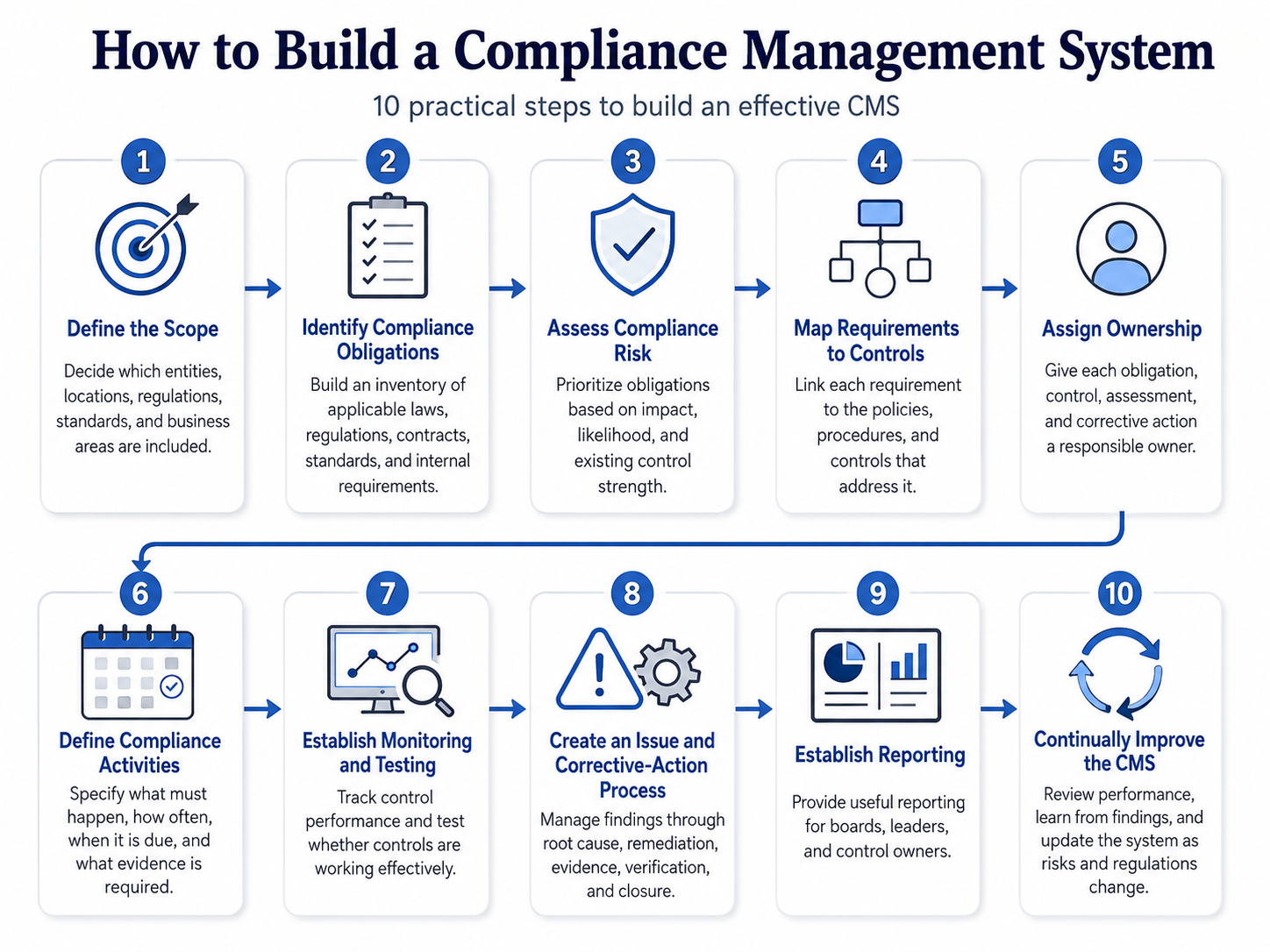
Step 5: Assign Ownership
A compliance control without an owner is unlikely to remain effective for long.
Each obligation, control, assessment, and corrective action should have clearly identified responsibility.
Compliance teams often provide oversight, but they should not automatically become the operational owner of every control. Many controls appropriately belong to IT, HR, Finance, Operations, Procurement, Security, Legal, or other business functions.
The CMS should make ownership visible and maintain accountability even when employees change roles.
This is where many spreadsheet-based programs struggle. Responsibility may exist in someone’s memory but not in the system itself.
Step 6: Define Compliance Activities
Controls need to be translated into specific activities.
Determine what needs to happen, who needs to do it, how frequently it should occur, when it is due, and what evidence demonstrates completion.
For example, a control requiring quarterly vendor reviews should define which vendors are included, who performs the review, what information is assessed, when the review occurs, what evidence must be retained, and who reviews the outcome.
Clear activity design reduces ambiguity and makes automation more useful.
Step 7: Establish Monitoring and Testing
Organizations should not assume controls are effective simply because activities are marked complete.
Monitoring provides ongoing visibility into whether responsibilities are being performed and whether exceptions are developing.
Testing evaluates whether the underlying control is designed appropriately and actually working.
The organization should define monitoring and testing frequency based on risk.
Higher-risk controls may require more frequent assessment, while lower-risk controls may justify longer intervals.
Monitoring should also establish what constitutes an exception. A missed deadline, failed control, expired piece of evidence, repeated incident, or negative assessment result should trigger an appropriate response.
Step 8: Create an Issue and Corrective-Action Process
A strong CMS needs a defined process for handling failures.
Findings can come from internal audits, regulator examinations, complaints, incidents, control testing, risk assessments, monitoring, or employee reports.
Each meaningful issue should be evaluated and, where appropriate, translated into corrective action.
The corrective-action process should identify the root cause, responsible owner, remediation steps, deadline, expected evidence, and verification process.
Closure should occur only when the organization has reasonable evidence that the issue has been addressed.
This produces another critical compliance chain:
Finding → Root Cause → Corrective Action → Owner → Evidence → Verification → Closure
Step 9: Establish Reporting
Leadership needs a clear picture of compliance health.
Reporting should focus on useful indicators rather than simply counting tasks.
Relevant information may include failed controls, overdue responsibilities, high-risk findings, corrective-action aging, repeated issues, evidence gaps, policy-review status, and upcoming regulatory obligations.
Different stakeholders may need different levels of reporting.
The board may need high-level visibility into material risk and significant issues. Compliance leaders may need framework-level performance. Department managers may need actionable lists of responsibilities assigned to their teams.
A well-designed CMS should support each level without requiring the compliance team to rebuild reports manually.
Step 10: Continually Improve the CMS
Compliance management systems should not remain static.
Regulations change. Businesses enter new markets. Products change. Organizations acquire companies. Employees change roles. New technologies introduce different risks.
The CMS should evolve with those changes.
Periodic management review can help determine whether controls remain appropriate, whether policies need revision, whether monitoring provides useful information, and whether recurring findings point to structural weaknesses.
Organizations should also analyze lessons from audits, incidents, regulatory examinations, internal investigations, and corrective actions.
The final stage of compliance management is therefore not simply closure.
It is learning.
Requirement → Control → Monitoring → Finding → Correction → Improvement
When this cycle operates consistently, compliance management becomes less reactive and more integrated into everyday business operations.