

Compliance Process Automation: Turning Compliance Into a Strategic Lever
Compliance teams regularly deal with overdue controls, rushed audit evidence requests, and spreadsheets that do not reflect current requirements. Manual tracking and frequent regulatory changes create gaps that surface during audits, not before them.

In fact, research shows that across organizations dealing with regulatory requirements, 67% experience at least 21 compliance‑related incidents per year, each demanding significant effort to investigate and resolve, often consuming hours of manual work that pulls you away from strategic priorities.
This isn’t about vague risks; it’s about the actual time pressure, uncertainty, and audit anxiety you feel every reporting cycle. In this blog, we will walk you through what compliance process automation is, how it works, why it matters, and how to implement it effectively.
Key Takeaways
- Compliance automation streamlines manual workflows, improving accuracy and efficiency.
- It reduces audit prep time and provides real‑time compliance dashboards.
- Core components include compliance management framework, workflow automation, reporting, and policy versioning.
- ComplianceOps, PolicyOps, RiskOps, and CaseOps integrate to unify GRC functions.
- Platforms like VComply enhance accountability, minimize errors, and free teams for strategic work.
Did you know?
In 2025, 75% of U.S. businesses were fined for data breaches or regulatory compliance failures, and more than one-third of those fines ranged from USD $333,000 to $1.3 million. This highlights how rapidly evolving regulations and manual compliance gaps are costing companies real money and risk exposure. Automation helps prevent costly breaches, fines, and operational chaos when manual processes can’t keep up.
What is Compliance Process Automation?
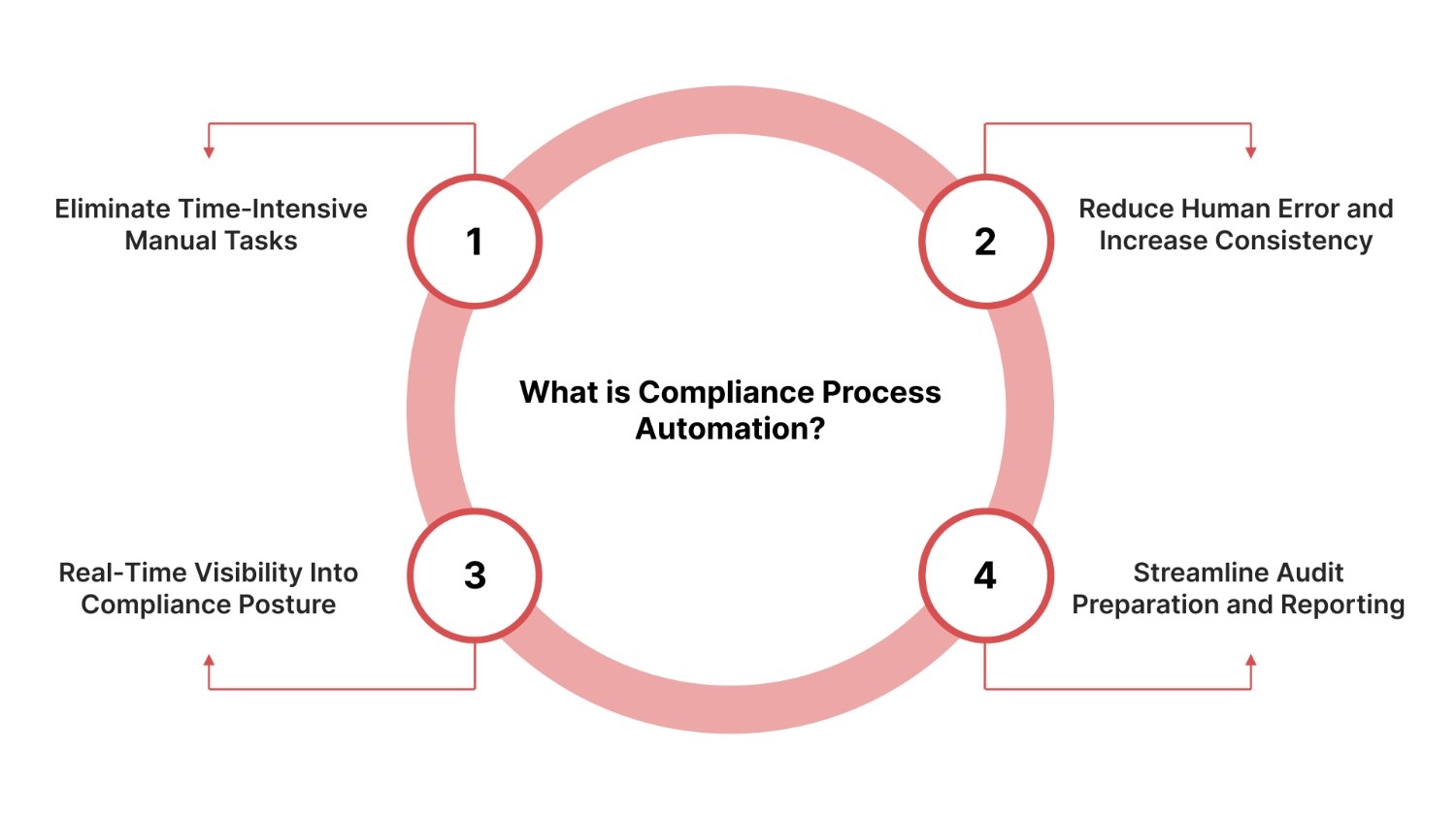
Compliance process automation is the practice of using software to systematically execute compliance‑related tasks and workflows that were previously done manually, ensuring accuracy, efficiency, and consistency across your organization’s regulatory requirements.
Instead of relying on spreadsheets, emails, and calendar reminders, automation standardizes repeatable steps and routes actions across responsible parties with minimal human intervention.
Below are the reasons why compliance automation is essential for modern organizations:
- Eliminate Time‑Intensive Manual Tasks: Compliance automation replaces repetitive work, such as evidence gathering, control updates, and reporting, with software‑driven workflows, freeing your team to focus on strategic risk mitigation instead of administrative overhead.
- Reduce Human Error and Increase Consistency: Automated systems apply consistent logic across compliance processes, minimizing variability and errors that are common when manual methods are used.
- Real‑Time Visibility Into Compliance Posture: With automation, real‑time dashboards provide up‑to‑date insights into regulatory risks and control gaps, enabling quicker responses and smarter decision‑making.
- Streamline Audit Preparation and Reporting: By automating evidence collection and compliance documentation, compliance automation significantly reduces audit prep time and enhances the reliability of submissions.
Also Read: AI-Driven Compliance in Real Estate: Benefits and Risks
Knowing why automation matters leads naturally to the next question: how does it actually work in practice? Let’s break down the process step by step.
How Compliance Automation Works: Step‑by‑Step
Compliance automation transforms manual, siloed compliance work into structured, rule‑driven workflows that reduce risk and increase operational efficiency.
This section breaks down the core phases of that transformation in a way your compliance team can relate to, from defining requirements to maintaining continuous compliance.
1. Mapping Regulations to Internal Policies
You start by translating specific regulatory requirements (e.g., HIPAA, SOX) into your own internal policies and controls. Automation platforms centralize those frameworks so that each rule can trigger the right sequence of compliance tasks rather than depending on individual memory or manual checklists.
2. Assigning Automated Tasks to Responsible Teams
Once requirements are mapped, compliant tasks are automatically assigned to relevant owners or teams with deadlines, reminders, and escalation rules built into the workflow, eliminating manual delegation and reducing bottlenecks.
3. Tracking Progress With Dashboards
Dashboards provide real‑time visibility into compliance status across controls, teams, and compliance frameworks. Instead of chasing updates, your team sees progress, pending items, and exceptions in one place.
4. Generating Real‑Time Compliance Reports
Automated systems compile evidence, audit trails, and compliance status reports on demand. This eliminates last‑minute scramble for documentation and supports faster, more reliable audit responses.
5. Continuously Monitoring and Improving Compliance Activities
Rather than point‑in‑time checks, automation continuously monitors compliance posture, triggers alerts for drift or failures, and feeds insights back into the process so you can refine controls and workflows.
To make these steps more tangible, here’s a practical example of how compliance process automation streamlines HIPAA task assignments in healthcare settings.
Example: HIPAA Task Assignment in Healthcare
In a healthcare setting, instead of manually emailing clinicians to attest to HIPAA policy changes and chasing old spreadsheets for evidence, automation platforms can:
- Detect updates to HIPAA requirements,
- Assign corresponding tasks automatically to IT and clinical compliance teams,
- Track acknowledgements and evidence collection via dashboards, and
- Generate an audit‑ready report with all logs traceable to task owners.
With VComply’s Compliance Ops, you can automatically assign compliance tasks, track progress across teams, and maintain audit-ready evidence without chasing spreadsheets or emails. This ensures your compliance processes are always accurate and on schedule.
Also Read: How Middle Eastern Organizations Should Plan Their 2026 Compliance Budgets
Behind this seamless workflow are the core components of compliance automation software that make it possible to execute tasks efficiently and reliably.
Key Components of Compliance Automation Software
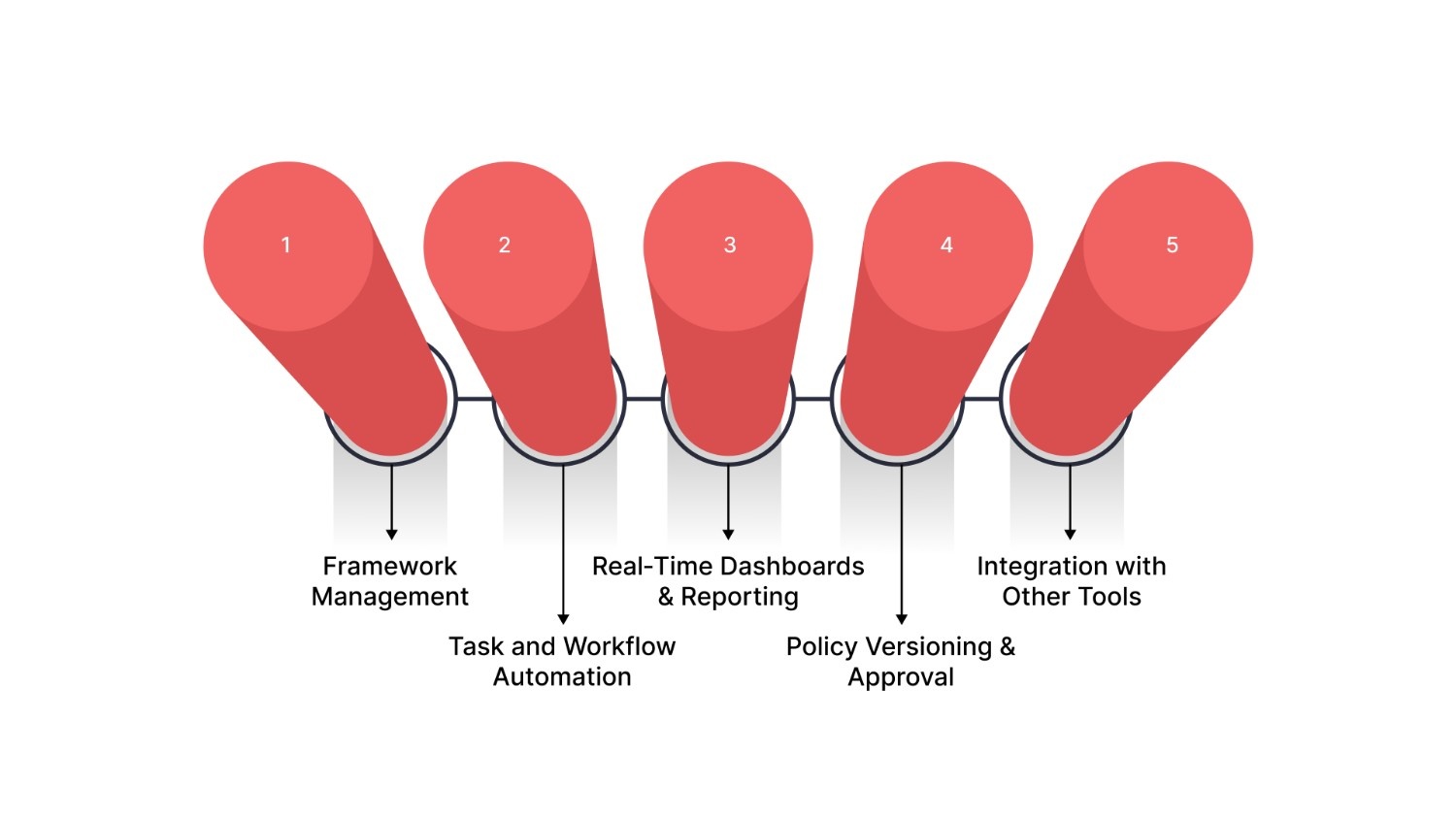
Compliance automation software unifies multiple functions to help your organization transition from manual processes to systematic, rule‑driven compliance execution.
Below are the core components that modern compliance automation tools must offer:
- Framework Management: This component enables the mapping of regulatory standards (e.g., HIPAA, ISO, GDPR) to your internal policies and controls, providing a central repository for all compliance requirements and reducing fragmented documentation and tracking.
- Task and Workflow Automation: Automates routine compliance actions, such as assigning tasks, triggering reminders, and escalating overdue items, based on predefined logic, eliminating the need for spreadsheets and manual delegation.
- Real‑Time Dashboards & Reporting: Live dashboards display the current compliance posture, control status, and gaps across frameworks, while automated reports compile evidence and audit trails on demand.
- Policy Versioning & Approval: Tracks changes to policies and procedures with version history, ensures that updates go through structured approval processes, and maintains an auditable record of revisions.
- Integration with Other Tools (CaseOps, RiskOps, PolicyOps): Deep integration with incident management (CaseOps), risk monitoring (RiskOps), and policy governance (PolicyOps) ensures that compliance activities feed into broader GRC workflows and decision‑making processes.
With these components in place, organizations can automate a wide range of compliance processes, reducing manual work and increasing accuracy.
What Can You Automate in Compliance?
Modern compliance automation enables organizations to streamline core regulatory and governance tasks, reducing manual effort and ensuring accuracy across your compliance program.
Below are key processes that benefit most from automation:
- Policy Management & Updates: Automated platforms centralize regulatory requirements and internal policies, pushing updates and ensuring all stakeholders are notified and aligned when changes occur, instead of relying on manual communication and spreadsheets.
- Task Assignment and Reminders: Rules‑based triggers automatically assign tasks to appropriate owners with deadlines, reminders, and escalation paths, eliminating manual delegation and follow‑up.
- Risk Assessments & Mitigation Tracking: Risk assessment workflows, scoring, and mitigation plans can be scheduled and tracked automatically, enabling continuous risk insight rather than periodic reviews.
- Incident & Case Management: When an issue occurs, automated systems log incidents, route them to responsible teams, and track resolution steps, replacing reactive tracking with structured workflows.
- Audit Documentation & Reporting: Evidence collection, control testing, and report generation are automated to produce audit‑ready documentation quickly and consistently.
- Employee Compliance Training: Compliance training schedules, completions, and certifications can be tracked and enforced automatically, ensuring personnel stay current without manual oversight.
Also Read: Human-Centered Compliance Leadership In 2026
Seeing the potential for automation begs the question: how does it actually change the day-to-day audit and compliance experience?
Your Audit Experience: Before vs After Automation
When your organization still relies on manual compliance and audit processes, preparing for regulatory reviews can feel chaotic, spreadsheets multiply, documentation is scattered, and visibility into controls is limited.
Below is a side‑by‑side comparison of how your audit experience changes when you adopt compliance automation:
Before Automation
- Manual Spreadsheets and Evidence Gathering: Gathering screenshots, policies, and logs across systems is time‑consuming and error‑prone, often requiring weeks of effort just to prepare for an audit.
- Missed Deadlines and Control Drift: Without central tracking, deadlines slip, and controls fall out of date, leading to last‑minute firefighting and increased audit risk.
- High Stress and Reactive Workflows: Teams are in “crisis mode” during audit season, reacting to requests and chasing evidence rather than proactively managing compliance.
- Limited Visibility Into Compliance Posture: Real‑time insights are unavailable, meaning you only discover control issues during audit engagements.
After Automation
- Dashboards with Real‑Time Compliance Status: Automated platforms provide up‑to‑date dashboards that clearly show which controls are compliant, missing, or at risk at any moment.
- Automated Reports and Evidence Collection: Evidence and documentation are gathered automatically from integrated systems and compiled into audit‑ready reports on demand.
- Improved Efficiency and Accuracy: Rule‑based workflows reduce human error, accelerate audit prep, and allow your team to focus on strategic compliance work.
- Proactive Compliance Posture: Continuous monitoring flags issues in real time, enabling remediation long before auditors request evidence.
VComply’s Risk Ops continuously monitors risk across your organization, automatically generating mitigation tasks and providing real-time insights so you can proactively manage vulnerabilities before they become audit issues or operational failures.
Beyond transforming audits, compliance automation directly addresses the common operational challenges that plague manual compliance efforts.
Challenges Compliance Automation Solves
Compliance teams face persistent operational hurdles that drain time and jeopardize accuracy. Below are the primary challenges compliance automation solves, each paired with the solution it delivers:
- Fragmented Workflows and Disconnected Systems
Fix: Automation centralizes compliance tasks and data, eliminating silos and enabling unified visibility into regulatory requirements and control status across the organization. - High Volume of Manual, Repetitive Tasks
Fix: By automating predictable work, such as evidence gathering, control testing, and reporting, compliance automation reduces repetitive effort and shifts focus to analysis and strategy. - Lack of Real‑Time Compliance Insights
Fix: Continuous tracking and dashboards deliver up‑to‑date status on risks and controls, preventing surprises and enabling proactive remediation rather than reactive scrambling. - Inconsistent or Error‑Prone Documentation
Fix: Automated logging and reporting standardize documentation, create reliable audit trails, and reduce the risk of human error that plagues manual processes. - Difficulty Scaling with Organizational Growth
Fix: As regulations expand and business complexity increases, automation scales compliance processes without proportional increases in workload or headcount.
Also Read: Top 10 Archer Alternatives for Compliance in 2026
To maximize its impact, compliance automation must be integrated with your broader Governance, Risk, and Compliance (GRC) operations, linking policies, risks, and incidents into a cohesive workflow.
How GRC Operations Integrate With Compliance Automation
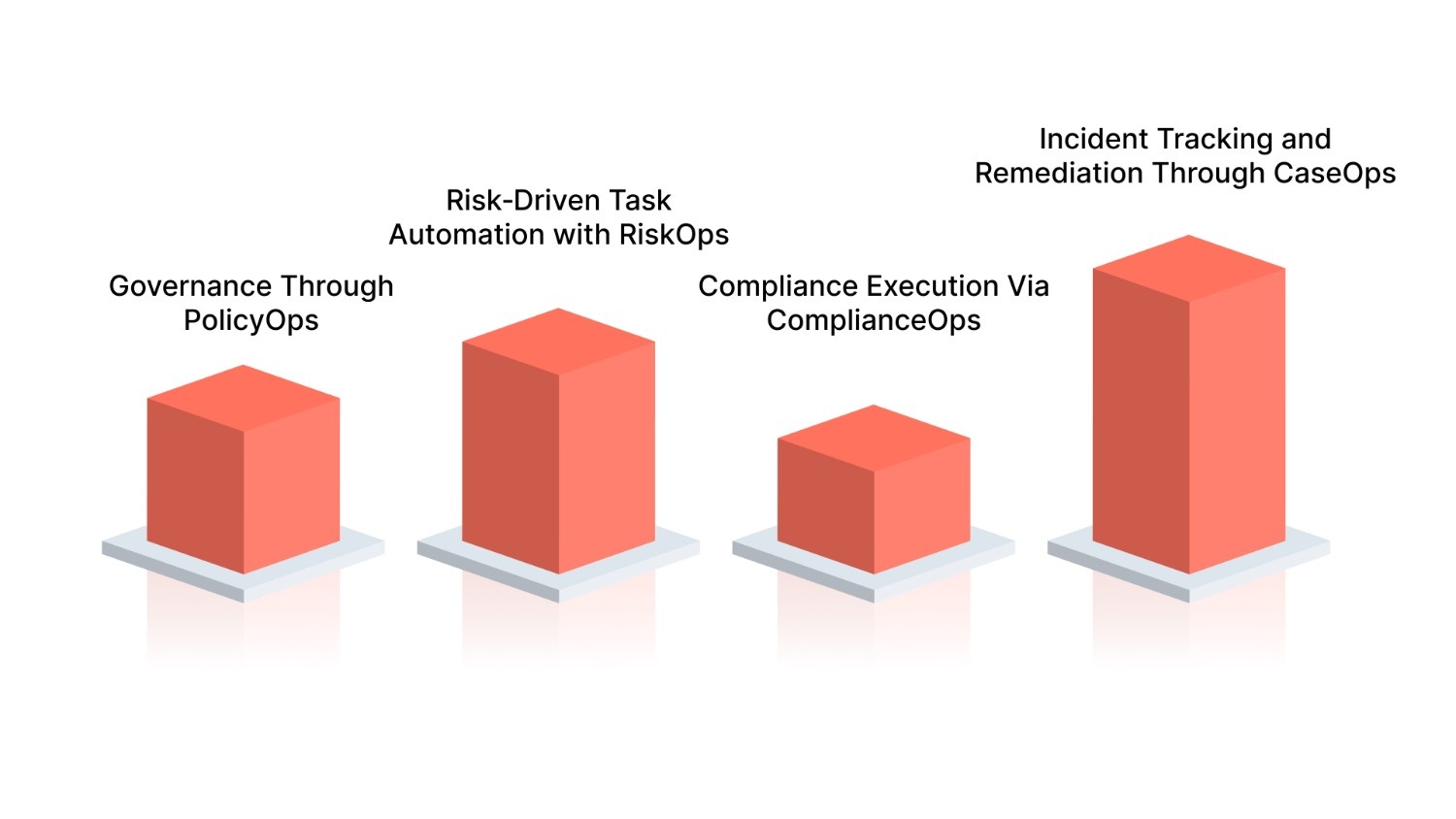
Governance, Risk, and Compliance (GRC) is an interconnected discipline that ensures your organization not only follows regulations but does so in a way that aligns with strategic goals and risk‑aware decision‑making.
Below is how the GRC components, ComplianceOps, RiskOps, PolicyOps, and CaseOps, work together within an automated scene:
- Governance Through PolicyOps: PolicyOps establishes and enforces policies that reflect organizational risk tolerance and regulatory requirements. When a policy is created or updated, the automation platform triggers workflows that alert relevant stakeholders, assign review tasks, and enforce version control.
- Risk‑Driven Task Automation with RiskOps: RiskOps continuously assesses internal and external risks (e.g., control failures, new threats). When risk changes or thresholds are breached, automation platforms can automatically create compliance tasks, initiate control tests, or adjust monitoring parameters.
- Compliance Execution Via ComplianceOps: ComplianceOps uses the policies defined in PolicyOps and the risk signals from RiskOps to automate recurring compliance tasks such as evidence collection, control assessments, and audit documentation.
- Incident Tracking and Remediation Through CaseOps: When an issue or exception occurs (e.g., control failure, audit finding), CaseOps logs the incident, routes it to appropriate owners, tracks remediation progress, and correlates the outcome with both risk and compliance data.
With VComply’s GRCOps Suite, your organization gains a single, connected view of governance, risk, and compliance. This aligns policies, incidents, and risk data in one platform to reduce silos, improve decision-making, and ensure continuous regulatory adherence.
Understanding this integrated model helps you evaluate the features and capabilities that a compliance automation platform should provide to support unified GRC operations effectively.
5 Things to Look for in Compliance Automation Software
When evaluating compliance automation software, choose features that help your organization maintain continuous regulatory adherence, increase visibility, and support scalability as regulatory frameworks grow more complex.
The following checklist highlights the core capabilities that top‑tier platforms should provide based on industry sources.
- Multi‑Framework Support: A strong platform should support multiple regulatory and industry frameworks (e.g., SOX, HIPAA, GDPR, ISO), allowing you to map controls across standards and avoid duplication of effort when expanding compliance scope.
- Automated Workflows & Notifications: Look for rule‑based workflows that automatically assign tasks, send reminders, and escalate issues to owners, ensuring compliance activities proceed without manual supervision.
- Audit‑Ready Reporting Dashboards: Real‑time dashboards and reporting tools that consolidate evidence and compliance status make it easier to generate audit‑ready outputs and visualize control effectiveness at a glance.
- Centralized Policy Management: A centralized repository for compliance policies and controls ensures consistent versioning and governance, reducing the risk of outdated procedures and fragmented documentation.
- Integration with Existing Tools: Seamless integration with systems such as ERP, IAM, HR, and collaboration platforms ensures evidence collection, control monitoring, and reporting are automated directly from your technology stack.
With these features in mind, let’s look at how VComply brings them together in one platform to simplify compliance automation across your organization.
How VComply Can Simplify Your Compliance Automation
When you’re responsible for managing compliance, risk, policies, and incidents across your organization, fragmented tools and spreadsheets slow you down and increase your exposure to errors and audit findings.
VComply is a unified Governance, Risk & Compliance (GRC) platform designed to simplify compliance automation by bringing all critical operations into one automated environment, giving you clarity, control, and audit readiness.
Below is how VComply’s automation suite supports your compliance journey and drives measurable operational outcomes:
- ComplianceOps: Automated Task Assignment & Framework Mapping: VComply’s ComplianceOps centralizes compliance obligations and control requirements across frameworks like SOX, HIPAA, GDPR, or ISO, then automatically assigns related tasks to owners, tracks progress, and provides real‑time visibility into compliance posture.
- PolicyOps: Versioning, Approval, & Enforcement: With PolicyOps, policy creation, approval, distribution, and acknowledgement become structured and automated, helping you maintain consistent policy versions, enforce updates across teams, and reduce risks from outdated procedures.
- RiskOps: Proactive Risk Monitoring & Mitigation: VComply’s RiskOps automatically quantifies, consolidates, and monitors risk data, enabling proactive mitigation by integrating risk insights directly into compliance tasks and dashboards, which helps your teams address vulnerabilities before they escalate.
- CaseOps: Incident & Case Handling with Accountability: CaseOps captures incidents, routes them to the right teams, tracks remediation steps, and closes the loop with risk and compliance data, ensuring consistent resolution workflows and traceability throughout the lifecycle.
Ready to streamline your compliance automation with VComply? Book a demo with VComply to see how your organization can simplify compliance, risk, policy, and incident management in one platform.

Final Thoughts
Compliance process automation fundamentally changes how your organization manages regulatory demands, risk posture, and audit readiness. Manual compliance efforts often leave teams scrambling for evidence, juggling spreadsheets, and trying to keep control documentation up to date. Automation replaces this reactive cycle with a structured, predictable, and continuously monitored process that keeps your operations aligned with regulatory requirements in real time.
As a cloud‑based GRC platform, VComply brings compliance automation to life by streamlining your governance, risk, compliance, and incident workflows in one place. VComply provides automated task assignment, real‑time dashboards, centralized policy management, evidence consolidation, and framework‑aligned workflows.
Ready to transform compliance from a burden to a capability? Start your 21‑day free trial of VComply today and experience how automated compliance process management can increase efficiency and simplify audit readiness for your organization.
FAQs
Industries with complex regulatory requirements, such as financial services, healthcare, pharmaceuticals, energy, manufacturing, and technology sectors, benefit most from compliance automation because it centralizes controls, provides audit trails, and reduces risk exposure amid changing rules. These sectors face heavy regulation that makes manual compliance inefficient and error‑prone.
Compliance automation tools can handle standards like HIPAA, SOC 2, PCI DSS, ISO 27001, GDPR, CCPA, and SOX by mapping internal controls to framework requirements and automating evidence collection, reporting, and monitoring across these regulatory domains.
Yes. Effective compliance automation integrates with ERP systems (e.g., SAP, Oracle), IAM solutions, HR platforms, and cloud services to pull real‑time data for automated tracking, evidence gathering, and control monitoring directly from enterprise systems.
Absolutely. Compliance automation supports continuous monitoring of systems, processes, and controls to detect anomalies and non‑compliance in real time, far beyond periodic audit cycles, keeping your compliance posture proactive instead of reactive.
Implementation time varies with organizational complexity and readiness, but initial adoption, including framework mapping and workflow setup, can often be completed in weeks to a few months with proper planning and executive sponsorship. More extensive integrations may take longer.