

Top 7 GRC Software and Tools for 2026
As regulatory demands intensify, cyber-risk grows, and AI-driven governance becomes a board-level concern, governance, risk, and compliance can no longer be treated as an afterthought. Manual spreadsheets and siloed compliance functions cannot keep pace with the complexity and scrutiny modern organizations face.

In 2025, U.S. regulators imposed over $4.3 billion in financial penalties on companies for compliance failures, a sharp reminder that governance, risk, and compliance cannot be an afterthought. For compliance officers, risk managers, CTOs, and CEOs, managing audits, policies, incidents, and cross-industry regulations has turned into a full-time operational headache.
That’s why modern organizations are investing in advanced GRC tools that automate compliance, centralize risk, and enable real-time oversight. In this blog, you will discover the top 7 GRC software and tools for 2026, what sets them apart, who they’re best for, and how to choose the right one for your business needs.
Key Takeaways
- You need modern GRC tools in 2026 to keep pace with faster regulatory changes, expanding digital risks, and growing internal complexity.
- The best GRC software helps you automate workflows, centralize oversight, and support real-time decision-making across compliance, risk, audit, and incident functions.
- VComply stands out as a unified, cloud-based platform with modular Ops suites that streamline end-to-end governance for fast-growing US organizations.
- Comparing leading platforms like VComply, LogicGate, SmartSuite, AuditBoard, MetricStream, ZenGRC, and Diligent helps you identify which system aligns with your structure, maturity, and operational needs.
- Choosing the right GRC tool requires assessing your regulatory scene, workflow patterns, integration needs, and ability to scale without adding complexity.
Why GRC Tools Matter More Than Ever in 2026

Staying ahead of regulatory expectations in 2026 requires more precision, more speed, and more visibility than you have ever needed before. New technologies, developing fraud patterns, and tighter oversight mean your teams must respond faster and with cleaner data.
If your workflows still rely on scattered files or outdated systems, you risk missing critical signals that impact audits, board updates, or strategic decisions. This is exactly where modern GRC tools become essential to your daily operations.
Here are the key forces shaping your need for stronger GRC software in 2026.
- Escalation of Digital Exposure: You are adopting new platforms, AI tools, cloud vendors, and third-party integrations at a rapid pace. Each addition expands your exposure and creates oversight blind spots unless you use GRC systems (sparsely) that centralize monitoring. For example, if your engineering team spins up a new tool without proper review, high-risk access settings can go unnoticed.
- Faster Regulatory Response Cycles: Regulators expect quicker reporting and clearer evidence. You cannot afford long manual prep cycles when expectations shift in days. With the right GRC software, you can prepare structured responses fast and avoid scrambling during examinations.
- Board Pressure For Continuous Risk Insights: Your board wants ongoing updates, not quarterly summaries. If you cannot provide real-time visibility, strategic decisions suffer. A modern GRC tool equips you with dashboards that support proactive conversations rather than reactive explanations.
- More Complex Vendor Dependencies: Every new vendor introduces operational risk that you must track, assess, and revisit. Without automated workflows from GRC software, renewals, reviews, and red flags slip through the cracks, especially when your vendor list expands across multiple departments.
- Rising Expectations For Internal Accountability: Your teams need clarity on who owns what. Misalignment leads to delayed tasks and unfulfilled controls. Modern GRC systems help you assign ownership with precision, so compliance work does not stall.
- Higher Volume Of Internal Incidents: As your operations grow, small issues surface more frequently. Without structured case handling, patterns get missed. A strong GRC tool lets you analyze minor incidents early so they never escalate into investigations.
Also Read: Are You Audit-Ready? A Deep-Dive Guide for Internal Compliance Leaders
As the importance of strong GRC frameworks becomes clear, it’s time to explore the leading platforms that are setting the standard in 2026.

Top 7 GRC Software and Tools for 2026
Selecting the right GRC tool in 2026 requires more precision than ever because your operational risks, digital environments, and internal controls develop at a pace older platforms cannot match. You now need GRC software that adapts quickly, integrates cleanly with your tech stack, and supports real-time decision making across compliance, risk, and audit functions.
Long feature lists no longer define the best GRC systems. They are defined by how effortlessly they help you anticipate issues before they disrupt your business. This list highlights the GRC software leaders shaping that new expectation.
Below are the top-ranked tools you should evaluate next.
1. VComply
Source:- https://www.v-comply.com/
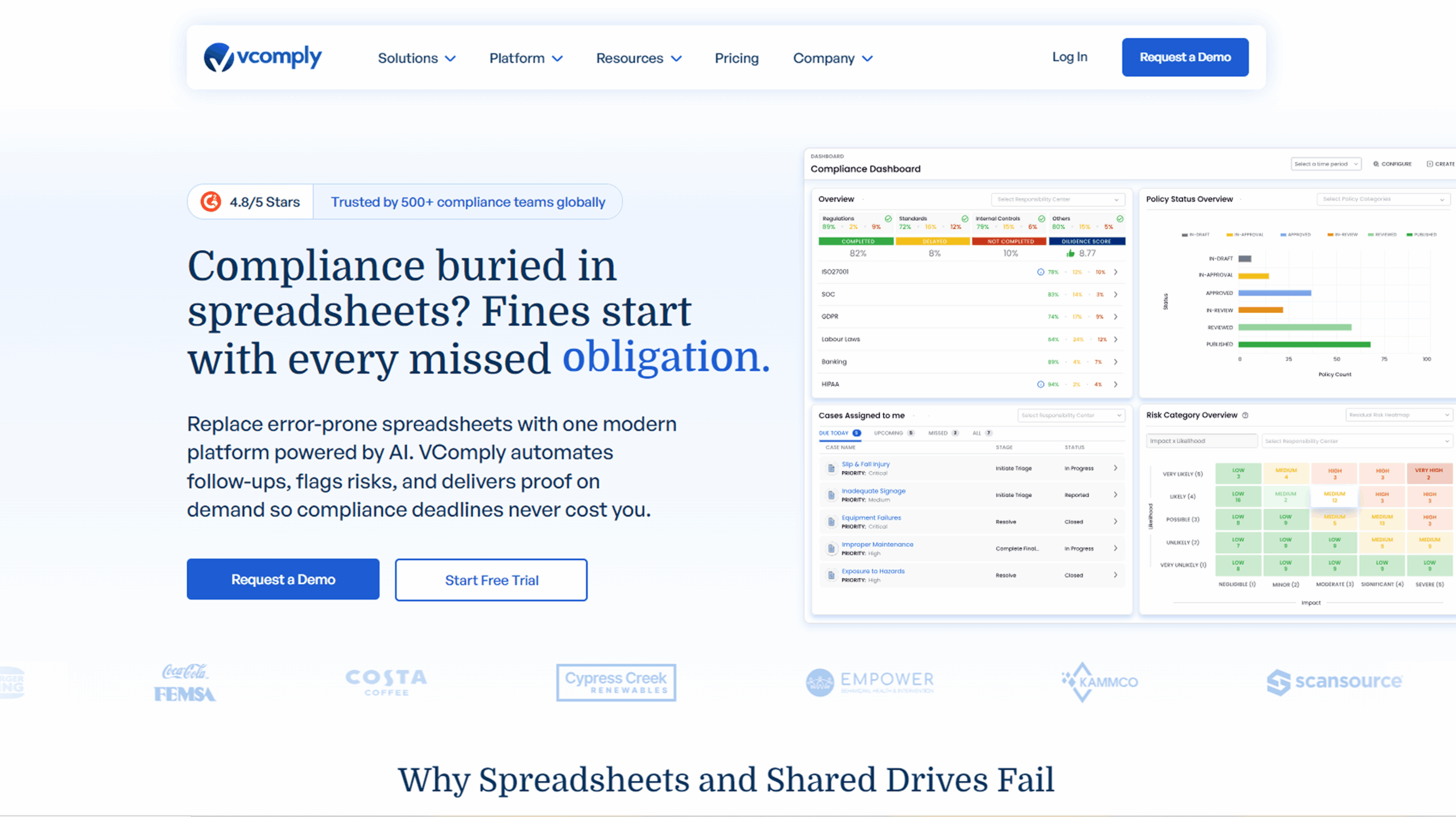
You need a GRC solution that keeps pace with complex compliance, risk, policy, and incident workflows. VComply delivers all that in a unified platform built to scale with your team. When you migrate from spreadsheets or scattered tools, VComply gives you a single source of truth, one place to manage compliance, risk, policies, audits, and cases.
Below are the key strengths that make VComply stand out for you.
- End-to-End GRC Automation: VComply ties together compliance tasks, risk assessments, policy lifecycle, audits, and incident handling in one system. You don’t juggle separate tools or spreadsheets. Instead, everything lives under one roof, giving you clarity and reducing errors.
- Modular Setup with Flexible Ops Suites: Whether you need compliance workflow automation (ComplianceOps), enterprise-risk management (RiskOps), policy lifecycle control (PolicyOps), or incident/case tracking (CaseOps), VComply lets you choose what you use. You can scale gradually as requirements grow.
- Real-Time Visibility and Executive Reporting: Custom dashboards, heatmaps, and consolidated reporting give you and your leadership team a real-time snapshot of risk posture, compliance status, and audit readiness. That helps you drive strategic decisions rather than chasing issues.
- Centralized Evidence, Audit Trails & Proof-Ready Compliance: When an audit hits, you can quickly pull up documented workflows, policy attestation history, risk-treatment records, and incident logs, everything tied to relevant controls. That turns audit prep from a scramble into a quick retrieval exercise.
- Adaptable Across Industries and Frameworks: Whether you operate in financial services, healthcare, education, manufacturing, energy, or other regulated sectors, VComply supports standard frameworks (e.g., ISO, SOX, NIST, PCI) and custom compliance structures. It adapts to your regulatory scene and internal workflows.
- Faster Onboarding and Seamless Adoption for Growing Teams: As a cloud-based GRC system, VComply offers a straightforward setup process. Teams across departments or geographies can adopt it without heavy technical overhead. That makes it ideal for growing or distributed organizations aiming for consistent GRC practices.
Take charge of your governance, risk, and compliance programs with VComply’s integrated GRC suite. Explore ComplianceOps, RiskOps, PolicyOps, and CaseOps, designed to help you strengthen oversight, improve transparency, and stay audit-ready year-round. Start your VComply journey as you evaluate the top GRC tools for 2026.
2. LogicGate
If your organization faces dynamic risk patterns, complex compliance tasks, and cross-functional workflows, LogicGate gives you a flexible, rules-driven GRC platform that adapts to changes without heavy technical overhead.
LogicGate is especially useful when you need to configure processes, automate risk scoring, and connect governance workflows with real-time data.
Below are the capabilities and strengths that make LogicGate a leading choice for modern GRC programs.
- Configurable Risk and Compliance Workflows: LogicGate lets you build your own governance, risk, and compliance processes using drag-and-drop configuration. Instead of relying on fixed templates, you can tailor forms, logic rules, and escalation paths so your workflows reflect the way your teams actually operate.
- Adaptive Risk Scoring and Assessments: You can build flexible risk scoring models that update dynamically based on control performance, issue indicators, or incident history. This helps you prioritize high-impact risks and focus your team’s attention where it matters most.
- Integrated Incident and Issue Tracking: When a compliance gap or risk event occurs, LogicGate provides structured incident workflows that capture details, trigger notifications, and connect issues to related controls or assets. That means nothing slips through the cracks, and your remediation paths stay clear.
- Real-Time Dashboards and Visual Insights: With customizable dashboards, you gain visibility into risk trends, overdue activities, and control effectiveness without manual aggregation. These views help you brief leadership with up-to-date insights rather than static slides.
- Collaboration and Ownership Built In: You can assign owners, set accountability, and create cross-functional review paths directly in the system. This reduces ambiguity around tasks and helps teams work together without manual coordination.
3. SmartSuite
SmartSuite approaches GRC from a work management and process automation perspective, blending flexibility with structure so you can govern risk, compliance, and operational tasks in a single platform.
If your teams struggle with disconnected tools, ad-hoc spreadsheets, or cumbersome workflows, SmartSuite lets you unify your GRC processes while adapting to how your organization actually works.
Below are the strengths that make SmartSuite a compelling choice for modern GRC programs.
- Flexible Templates and Workflows: SmartSuite provides a library of pre-built GRC templates that you can customize to match your policies, controls, and risk frameworks. Instead of rigid, one-size-fits-all models, you build workflows that reflect your unique governance needs.
- Unified Work Management: Everything from risk assessments and audit plans to policy reviews and task assignments lives in one workspace. That centralization helps eliminate silos and makes it easier for cross-functional teams to see what’s pending, what’s overdue, and what’s complete without toggling between disparate systems.
- Automated Alerts and Notifications: SmartSuite’s automation engine lets you trigger reminders, escalate overdue tasks, and notify owners when conditions change. This keeps your governance activities moving forward and reduces the need for manual follow-ups.
- Real-Time Dashboards and Reporting: With customizable dashboards, you gain live insights into compliance status, risk heatmaps, and workflow bottlenecks. These visual summaries help you brief leadership with clarity and surface priority issues before they escalate.
- Low-Code App Builder: Beyond GRC, SmartSuite lets you create custom applications without coding. This means you’re not forcing your workflows into a fixed mold; you can evolve your processes as regulatory expectations or internal demands change.
- Collaboration Across Teams: With built-in comments, shared views, and linked records, your compliance, IT, security, and risk teams can work together in the same system. That shared context reduces misunderstandings and accelerates decision-making.
4. AuditBoard

Source:- https://auditboard.com/
If you manage frequent testing cycles or operate in an environment where assurance activities drive much of your compliance posture, AuditBoard can help you streamline that workload. It is built with audit teams in mind, so you gain a structured approach to planning, testing, walkthroughs, and issue tracking.
You may find it useful when your internal audit function needs a dedicated GRC tool that keeps evidence, findings, and timelines tightly organized without relying on scattered documentation.
Below are the capabilities that may support your audit and compliance operations.
- Centralized Testing and Documentation: You can maintain all test steps, evidence, observations, and sign-offs in one place. This helps you prevent version gaps when multiple auditors work on the same control.
- Continuous Audit Activity Tracking: If your audit program runs year-round, AuditBoard gives you structured calendars and progress visibility. You can see upcoming deadlines and pending reviews without toggling between different systems.
- Support for SOX and Assurance Heavy Workloads: Many teams handling high volumes of SOX controls use AuditBoard because it keeps testing cycles more predictable. You can also maintain clean records for walkthroughs and retesting.
- Issue Identification and Remediation Management: When you spot a weakness during testing, you can assign follow-up tasks to the right owners immediately. This helps you close gaps faster and maintain documentation for leadership updates.
- Dashboards Tailored For Audit Leaders: AuditBoard provides summary views that help you brief executives on trends, recurring issues, and remediation speed. This minimizes manual report preparation and improves the clarity of your updates.
5. MetricStream

Source:- https://www.metricstream.com/
If you operate in a highly regulated sector and need a structured approach to managing enterprise-wide programs, MetricStream offers a framework-oriented GRC software that can support your complexity.
You may find it useful when your governance activities involve multiple regulatory bodies, specialized assessments, and a high volume of coordination across departments. This platform works well when your workflows require strong alignment across compliance, risk, quality, security, and assurance teams.
Below are the capabilities that may fit your operational needs.
- Framework-Oriented Program Management: You can map your controls, processes, and assessments to regulatory frameworks used in industries like banking or healthcare. This helps you maintain clarity when different teams work with different standards.
- Support for Large Scale Risk Programs: MetricStream allows you to maintain multi-level risk assessments and risk treatment activities. If you run enterprise-wide workshops or require structured scoring, this setup can help you maintain order.
- Integrated View Of Governance Activities: You can bring together insights from risk, compliance, audits, and quality functions. This makes it easier to brief executives on patterns that appear across multiple lines of defense.
- Process-Based Workflow Structuring: MetricStream lets you define governance workflows that fit your operating rhythm. If your teams follow strict review paths or approval structures, you can configure those sequences directly in the platform.
- Role-Based Task Clarity: With permissions and task routes tied to responsibility, you can ensure that activities land with the right owners. This reduces confusion and supports timely follow-ups across departments.
6. ZenGRC

Source:- https://www.zengrc.com/
If you run a growing organization and need a practical way to strengthen your compliance and risk processes without a heavy lift, ZenGRC offers a straightforward GRC tool that helps you build structure quickly.
You may find it useful when you want clean documentation, easy tracking, and simple visibility into your obligations without investing in complex enterprise-scale setups. It is often selected by teams that want to mature their governance functions at a manageable pace.
Below are the capabilities that may support your needs.
- Simple Control And Requirement Tracking: You can organize controls and requirements in a clear layout that helps you maintain oversight without deep configuration. This works well when your team is still formalizing its governance processes.
- Workflow Ease for Smaller Teams: ZenGRC allows you to assign tasks and track progress in a lightweight format. If you do not have an extensive staff, this helps you keep responsibilities visible and on schedule.
- Clear Reporting For Stakeholders: You can generate summaries that help your leadership understand your compliance and risk position without needing technical context. This can be useful when your executives want quick reassurance or evidence of activity.
- Support for Common Frameworks: ZenGRC provides templates for widely used standards such as SOC and ISO. This helps you begin your compliance journey without building structures from scratch.
- Central Reference Library: ZenGRC lets you maintain documents and evidence in one place so your reviewers do not search through multiple folders during checks or updates.
7. Diligent

Source:- https://www.diligent.com/platform/diligent-one
If your leadership team expects clear visibility into risks, controls, and strategic priorities, Diligent gives you a governance-focused GRC software that supports board-level oversight. You may find it helpful when you need to give directors and senior executives structured insights that guide decision-making.
This platform suits organizations that want to elevate governance maturity by connecting operational activity with high-level reporting and accountability requirements.
Below are the capabilities you may value.
- Board Ready Insights and Reporting: You can present risk and compliance information in formats designed for senior leadership. This helps you communicate priority areas without overwhelming executives with operational detail.
- Structured Oversight Across Committees: If you have governance committees that require regular updates, Diligent helps you maintain consistent reporting cycles and clearly document ownership for follow-up tasks.
- Support for Strategic Risk Planning: You can align risk data with organizational objectives so your leadership team can understand how operational issues impact long-term strategy.
- Central Management of Policies and Key Documents: Diligent allows you to store essential materials in a centralized location. This helps you share updated versions with decision makers without risk of outdated files circulating.
- Visibility Into Emerging Risks: You can track early signals that indicate potential governance concerns. This equips your executives to take informed action before issues escalate.
Below is a snapshot of the top GRC tools for 2026, followed by a quick comparison table so you can see how each stacks up at a glance.
Comparison Table: Top GRC Tools at a Glance
Evaluating GRC software side by side helps you see how each option aligns with your regulatory workload, team structure, and long-term governance plans. Since every platform approaches compliance, risk, audit, and incident oversight differently, you need a clear view of what each GRC tool offers and where it fits best.
This comparison gives you a quick way to assess strengths, limitations, and suitability before you move deeper into demos or procurement discussions.
Below is a consolidated table to guide your evaluation.
| GRC Tool | Core Modules | Best For | Deployment Model |
| VComply | ComplianceOps, RiskOps, PolicyOps, CaseOps | Fast-growing teams needing unified end-to-end automation | Cloud |
| LogicGate | Risk, Compliance, Incident, Workflow Automation | Teams needing configurable, rules-driven GRC workflows | Cloud |
| SmartSuite | Compliance, Risk, Audit Workflows | Organizations seeking flexible work management–style GRC | Cloud |
| AuditBoard | Audit, SOX, Risk | Audit-heavy and assurance-driven environments | Cloud |
| MetricStream | Risk, Compliance, Quality, Audit | Highly regulated industries with structured frameworks | Cloud and on-prem |
| ZenGRC | Compliance, Risk | Small to midsize teams building GRC maturity | Cloud |
| Diligent | Governance, Risk, Compliance | Organizations prioritizing board-level visibility | Cloud |
With that comparison in place, you’ll be better equipped to choose the right GRC tool that fits your organization’s needs.
How to Choose the Right GRC Tool for Your Organization?
Selecting the right GRC software in 2026 is not just about features. It is about choosing a system that supports the way your teams think, communicate, and operate under pressure.
Below are the factors that help you make a confident choice.
- Understand Your Regulatory Priorities: List the specific laws, frameworks, and industry rules that shape your oversight. If you operate in sectors like healthcare or financial services, your GRC systems must support higher monitoring precision.
- Map Your Internal Workflows Clearly: Document how tasks move across your compliance, risk, and IT teams. For example, if control owners rely on structured reviews, you need a GRC tool that mirrors this rhythm.
- Check Adoption Readiness Across Departments: Evaluate whether your users prefer simple layouts or advanced configuration. The right match prevents pushback and speeds up platform acceptance.
- Review Integration Requirements Early: Identify where your data lives. If your security alerts or HR events matter to your governance work, pick GRC software that pulls information directly into your dashboards.
- Assess Total Cost and Longevity: Look beyond licensing. Factor in training, process redesign, and long-term scalability. Your ideal GRC tool should develop as your operations expand, not hold you back.
Simplify compliance and strengthen risk oversight with ComplianceOps and RiskOps. See how these two core engines help you manage regulations, automate controls, and monitor risk in real time, without disrupting existing workflows.
Once you understand how to select the right GRC tool, it’s equally important to recognize the common compliance challenges organizations face and how to address them effectively.
Common Challenges in Compliance and How to Overcome Them
As your organization grows, your compliance responsibilities become more layered and interconnected. You are expected to maintain precision while managing tighter timelines, expanding vendor networks, and increasing data volumes.
Below are the issues you are most likely to face and how you can address them.
- Inconsistent Documentation Across Teams: When different departments maintain their own formats, you lose clarity during reviews. Set uniform templates and require teams to store materials in a central location. This prevents rework during audits.
- Unclear Ownership of Key Activities: If no one knows who is responsible for a control or assessment, tasks stall. Assign named owners and outline expectations clearly so follow-ups do not get delayed.
- Slow Detection Of Internal Issues: Minor process gaps often stay hidden until they escalate. Build simple reporting paths so your staff can flag concerns early. A small pattern reported today prevents a major problem later.
- Difficulty Keeping Pace With New Requirements: Regulations shift quickly, especially in industries facing high scrutiny. Establish a recurring review cycle so you stay updated without relying on last-minute adjustments.
- Limited Engagement From Operational Teams: If teams view compliance as a burden, quality drops. Provide short training sessions that explain the value behind each task. When people understand the purpose, participation improves.
After understanding the key compliance challenges, the next step is applying practical strategies to ensure a smooth GRC implementation in 2026.
Practical Tips for a Smooth GRC Implementation in 2026
Rolling out a new GRC tool is not only a technology shift. It is a change in how your teams communicate, document, and make decisions. The more intentionally you plan this transition, the faster you create momentum and avoid resistance.
Below are the steps that help you implement GRC systems successfully in 2026.
- Secure Executive Alignment Early: Make sure your leadership understands why you are adopting a new GRC software. Their support helps you overcome department-level hesitation and speeds up approvals.
- Document Your Processes Before Migration: Map your current tasks, control checks, and review cycles. When you know exactly how your workflows run, you can configure your GRC tool to match them without trial and error.
- Prioritize A Clean Data Import: Remove duplicates, outdated controls, and unused references before uploading anything. A clean start prevents confusion when your users log in for the first time.
- Start Automation With High Volume Activities: Identify repetitive tasks like attestations, recurring reviews, or periodic assessments. Automating these early steps helps your teams feel the impact immediately.
- Track Adoption Metrics Actively: Do not assume teams are using the GRC software correctly. Check login trends, task completion rates, and feedback. Adjust training based on real usage patterns.
- Enable Cross-Functional Collaboration from Day One: Invite teams from IT, HR, security, finance, and operations into shared spaces. This reduces communication gaps and builds a unified approach to governance.
Once your implementation plan is in place, it’s helpful to look ahead at the trends that will shape compliance and GRC in the coming years.
Future Trends in Compliance and GRC You Should Prepare For
Compliance and risk functions are entering a new phase where your responsibilities extend far beyond traditional control checks. You will be asked to evaluate emerging technologies, guide ethical decision-making, and provide real-time insights that shape organizational strategy.
As regulators, customers, and boards demand greater transparency, you need tools and frameworks that help you anticipate issues instead of reacting to them. Preparing now positions you to lead these conversations with confidence.
Below are the trends you should plan for.
- Growth of AI-Driven Oversight: You will need to assess how AI models are trained, monitored, and governed. Expect requirements for fairness reviews and technical documentation that show how high-risk models behave.
- Expansion of Digital Audit Trails: Regulators will look for validated proof of activity across systems. Strong documentation and accurate timestamps will matter more than static reports.
- Higher Scrutiny on Third-Party Integrity: Vendor risks will expand beyond security. You will evaluate ethical practices, sustainability claims, labor risks, and geopolitical exposure when reviewing partners.
- Shift Toward Continuous Monitoring: Instead of cyclical assessments, you will move toward always-on evaluation. This gives stakeholders more current visibility into governance readiness.
- Rise of Industry-Specific Requirements: New frameworks will target niche challenges in healthcare, finance, education, and energy. You will need flexible processes that adapt quickly.
- Greater Demand for Governance Transparency: Customers and investors will expect clear explanations of how your organization handles risk. This will require concise communication and stronger internal alignment.
Read Next: How to Build a Risk Register That Actually Guides Decisions
With these upcoming trends in view, we can now bring everything together in the final conclusion.

Wrapping Up
Modern compliance and risk programs require far more coordination, visibility, and precision than traditional workflows can support. As your regulatory scene expands and operational dependencies grow, the right technology becomes a strategic advantage rather than a convenience.
A strong GRC software helps you elevate governance maturity, reduce uncertainty, and give your leadership clear insight into how well your organization is protected. Choosing the right platform sets the foundation for better decisions, cleaner execution, and long-term resilience.
VComply supports you with a modern, cloud-based GRC suite built for scale, clarity, and practical performance. With ComplianceOps, RiskOps, PolicyOps, and CaseOps working together, you gain a unified system that simplifies oversight and strengthens accountability across your entire organization.
Ready to see how VComply can transform your governance workflows? Book a personalized demo today.
FAQs
A GRC tool helps you structure compliance, risk, audit, and incident activities in one system. It connects tasks, owners, data, and evidence so you can track everything consistently. You gain visibility into what is happening, what is overdue, and what needs escalation, which strengthens daily decision-making.
You have outgrown your process when tasks slip, evidence is scattered, audits take too long, or teams rely heavily on manual follow-ups. If you struggle to maintain consistency or visibility across departments, it is time to upgrade to a scalable GRC system that can support your workload.
GRC software covers compliance, audit, incident handling, and risk activities, while ERM solutions focus mainly on enterprise risk planning. With GRC, you track controls, tasks, and documentation across multiple functions. ERM helps you evaluate strategic risks. Many organizations use both, but GRC gives broader operational oversight.
Costs vary based on modules, users, and support needs, but mid-sized organizations often pay annually for cloud-based GRC platforms. Pricing typically reflects the number of functions covered, such as compliance, risk, policies, or incident management. Budgeting should also include training and long-term adoption planning.
Warning signs include poor user adoption, inconsistent data, unclear responsibilities, and heavy manual rework. If dashboards do not reflect accurate information or teams rely on spreadsheets despite having a platform, your implementation requires recalibration. Successful GRC setups create clarity, not confusion, across workflows and reporting.