

Policy Attestation: How to Confirm Employees Understand Their Responsibilities
A new policy goes live on Monday. By Friday, most employees have clicked “Acknowledge.” The dashboard looks good. Then a manager asks whether employees with an existing conflict of interest need to disclose it again under the revised policy. Nobody is sure. The completion report shows who responded, but the form never asked employees to review or update their disclosures.
That gap is where policy attestation matters. A well-written attestation tells employees exactly what they are being asked to confirm. It gives them a way to raise questions or disclose exceptions, and it creates a record the organization can use later. A vague attestation creates a completion record with limited value.
Policy attestation is often conducted through digital acknowledgment systems or compliance software, where employees must confirm acceptance of policies such as a code of conduct, data privacy policy, or IT security policy.
This guide explains what policy attestation is, when to use it, and how to build a process that employees can complete and compliance teams can verify.
What is policy attestation?
Policy attestation is a documented confirmation that an individual has taken a specified action or made a declaration about a policy. Depending on the policy, the individual may confirm that they reviewed a particular version, understand a responsibility, completed a required step, or disclosed an exception.
For example, an employee may confirm that they reviewed the information security policy and know how to report a suspected incident. A procurement manager may attest that they disclosed any personal interests involving suppliers they oversee. A department head may certify that they reviewed local procedures against a revised corporate policy and submitted any gaps for remediation.
Each statement creates a different record. The first captures a review and a self-reported understanding of a responsibility. The second captures a disclosure declaration. The third captures a manager’s confirmation that a specific review was performed. The wording determines what the organization can reasonably conclude from the response.
Policy attestation vs. policy acknowledgment
Organizations often use these terms interchangeably. For workflow design, it helps to distinguish a basic acknowledgment of receipt or review from a more specific attestation about an action or condition. Choose the response that matches the evidence you need.
| Response type | What it records | Example |
|---|---|---|
| Acknowledgment of receipt | The person confirms they received the policy. | “I acknowledge receipt of the updated remote work policy.” |
| Confirmation of review | The person confirms they reviewed a specific version. | “I confirm that I reviewed version 3.0 of the information security policy.” |
| Declaration | The person states whether a condition applies or confirms they made a disclosure. | “I have disclosed any actual or potential conflicts of interest known to me.” |
| Confirmation of action | The person confirms completion of a defined responsibility. | “I completed the required review of access permissions for my team and submitted any exceptions.” |
Use a brief knowledge check when employees need to apply a rule, such as deciding when to report a gift. Use operational evidence when you need to verify that a control worked. For example, a manager’s attestation can document that they completed an access review. The access list, review notes, and records of removed permissions provide evidence of what the review found and what changed.
Which policies should require attestation?
Start with the consequence of someone missing or misunderstanding the policy. A formatting update to a travel guide may only need a publication notice. A change to how employees disclose conflicts of interest may warrant a targeted attestation because it changes what people must do.
Common candidates include codes of conduct, conflicts of interest, gifts and hospitality, information security, privacy, workplace conduct, and acceptable use. A role-specific attestation can also make sense for higher-risk responsibilities, such as approving suppliers, handling sensitive information, or managing privileged system access.
For each policy, ask three questions:
- Who has a responsibility under this policy? Consider role, location, employment status, and access. Employees, managers, and contractors may have different obligations.
- What do they need to confirm? Identify the action or declaration the response should capture, such as reviewing a new reporting procedure or submitting a disclosure.
- What will we do with the response? Decide who reviews exceptions, when to follow up on nonresponses, and how the record will be used.
These questions also help control volume. If employees receive attestations for every policy change, they may treat them as routine clicks. Targeting requests to the people whose responsibilities changed makes the reason for each request clearer.

How to write a policy attestation statement
Write the statement so the employee can tell whether it is true before submitting it. Name the policy or version, specify the action, and explain how to proceed if the person cannot confirm it. Use multiple questions when a process needs several distinct answers.
For example, a single statement such as “I have read, understood, and complied with all applicable policies” combines claims that are difficult to interpret later. If an employee selects “Yes,” the compliance team still has little detail about which policy was reviewed, what conduct was covered, or whether the employee had anything to disclose.
A targeted conflict-of-interest attestation might read: I confirm that I reviewed version 4.0 of the Conflict of Interest Policy. I have selected the option below that reflects my current circumstances.
The form could then offer three choices:
- I have no actual or potential conflict of interest to disclose at this time.
- I have submitted a disclosure through the conflict-of-interest reporting form.
- I need guidance to determine whether a situation should be disclosed.
The third option gives employees a way to respond honestly when the answer is unclear. The disclosure option should direct sensitive details to the designated reporting channel. The attestation record can capture the response and, where appropriate, a reference to the disclosure without storing the details in a broadly accessible report.
How to run a policy attestation campaign
1. Define the trigger and audience
Build campaigns around events that matter to the policy. Common triggers include onboarding, role changes, a material policy revision, or a scheduled declaration cycle. Someone who moves into procurement in June may need to review the supplier conflicts policy immediately, even if the next organization-wide campaign is months away.
Before launch, confirm the audience with HR or the relevant business owner. Check for employees on leave, recent transfers, and contractors who may need a separate distribution method. An accurate audience makes completion rates easier to interpret and reduces follow-up with people who were never in scope.
2. Publish the approved version and explain what changed
Assign the approved policy version and make it easy to find. In the notification, summarize any material changes and identify the action employees must take. A short explanation can save employees from having to compare two lengthy documents to work out what applies to them.
For example, if the gifts policy changes the approval threshold, name the change in the notice and tell employees where to request approval. If local requirements vary, direct people to the applicable version or addendum. Give employees a clear deadline and contact for questions.
3. Collect each response against the assigned version
Record the employee’s identity, the policy version, the attestation statement shown, the response, and the submission date. Retain access to the exact policy and wording associated with the record. That matters when an auditor or manager asks what an employee confirmed before a later revision took effect.
Consider how people will complete the request. A field employee may need mobile access. A shift worker may need time during working hours. A supervisor may need a view of assignments for their team without access to confidential disclosure details. These choices affect whether a campaign produces reliable records.
4. Follow up on overdue responses and exceptions
Use reminders before the deadline and route overdue assignments to the appropriate manager or policy owner. Decide how to handle legitimate delays, such as leave or access problems, so those cases can be distinguished from unresolved nonresponses.
Track exceptions alongside completion. An employee who asks for guidance has responded, but the underlying question still needs an owner. Separate follow-up statuses such as awaiting employee response and awaiting compliance review help teams see where action is required. For sensitive matters, limit access to the people responsible for reviewing them.
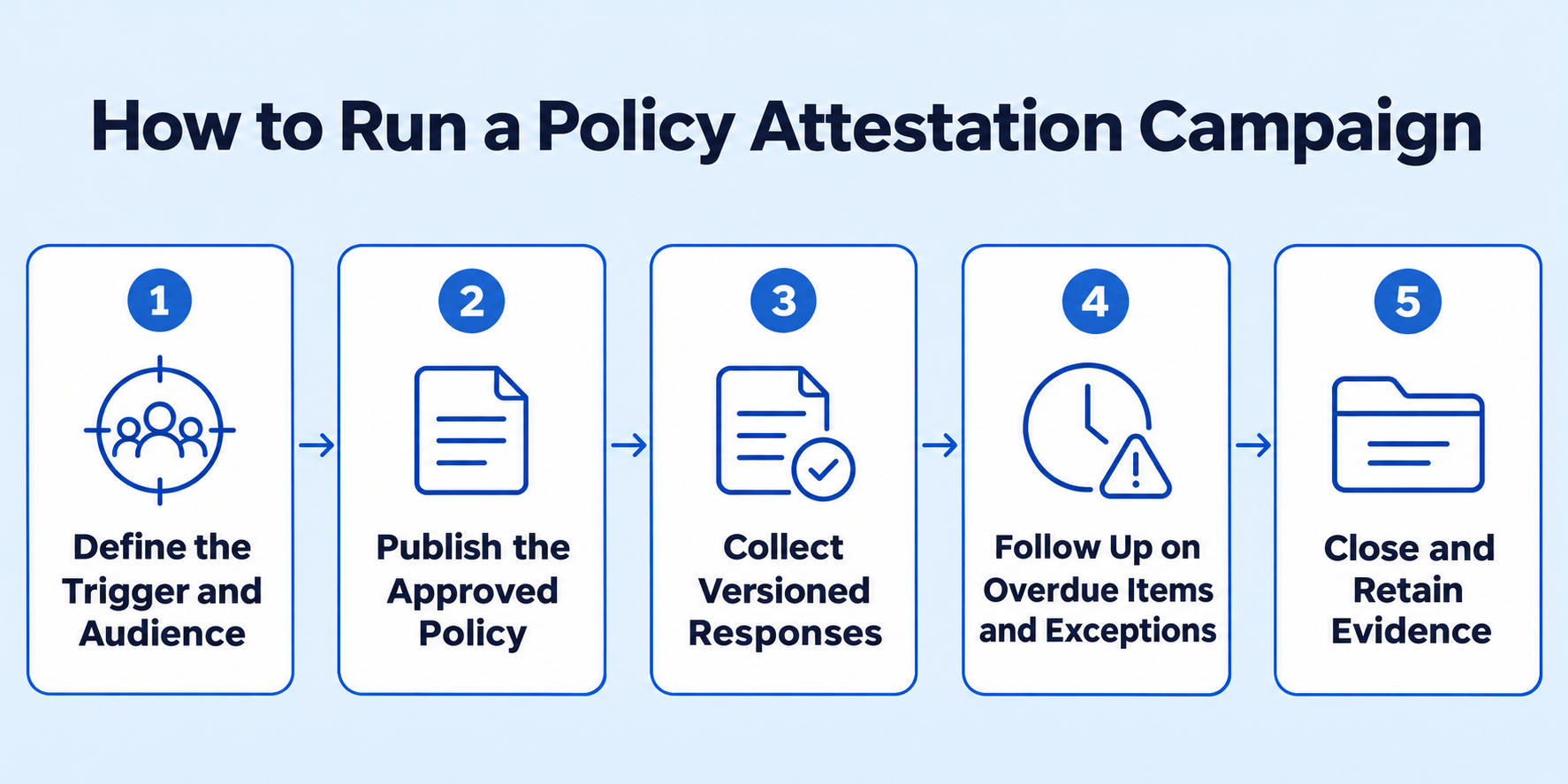
5. Close the campaign and retain the evidence
At close, reconcile the audience and document any outstanding items. Keep a record of who was assigned the policy, who responded, which version applied, and how exceptions were handled. Apply the organization’s retention and access rules to the resulting records.
Review the campaign while the details are still fresh. If several employees asked the same question about a policy, revise the guidance or add a practical example. If one location had a high rate of overdue responses, check whether the issue was timing, access, or unclear ownership before sending another round of reminders.
What policy attestation looks like in practice
Consider a healthcare organization that updates its policy for reporting suspected privacy incidents. The revision changes where staff submit a report and identifies a separate escalation contact for urgent cases.
The privacy team assigns the updated policy to the employees and contractors who handle patient information. The notice highlights the new reporting channel and deadline for completing the attestation. Employees confirm that they reviewed the new version and answer a short scenario question about where they would report an incident. Anyone who cannot access the reporting channel can flag the problem in the form.
At the end of the campaign, leadership can see who completed the assignment, which locations have outstanding responses, and where staff had trouble identifying the reporting channel. The privacy team follows up on those issues and later reviews actual incident records to see whether reports are reaching the right team.
The campaign produces three pieces of evidence: a record of policy review, an indication of whether staff can identify the right channel in a scenario, and a basis for checking whether the reporting process works in practice.
What to measure beyond completion rates
A completion rate tells you how much of the assigned audience responded. Pair it with measures that show where communication, understanding, or follow-through needs attention.
| Measure | What it helps you see |
|---|---|
| On-time completion by role or location | Which parts of the organization may need more time, better access, or direct follow-up. |
| Outstanding high-priority assignments | Where people with higher-risk responsibilities have yet to confirm the current policy. |
| Open exceptions and time to resolution | Whether questions and disclosures are reaching the right reviewers and being addressed. |
| Knowledge-check results by question | Which rules or scenarios employees consistently misunderstand. |
| Recurring incidents or findings tied to the policy | Where policy guidance, training, controls, or day-to-day processes may need a closer look. |
Define the denominator for completion reporting. For example, if people on leave are deferred, show how many assignments were deferred and when they will return to scope. Keep the calculation consistent across campaigns so changes are easier to explain.
Common policy attestation mistakes
Reusing the same statement for every policy. A code of conduct, a conflicts declaration, and an access review ask different things of employees. Write the statement around the action you need to document.
Requiring a new signature for every edit. Base re-attestation on the impact of the change. A revised approval threshold may justify a new request. A corrected typo usually calls for a version note.
Treating exceptions as incomplete responses. A disclosure or request for guidance can be a valid response that requires separate action. Give the reviewer an owner and due date, and record the outcome.
Losing the link between the response and the policy version. A name and timestamp have limited value if the organization cannot retrieve what the employee saw and what they agreed to confirm. Keep that link intact when you revise or archive a policy.
How policy management software supports attestation
A policy management platform can connect the approved document, assigned audience, response records, reminders, and reporting. During a demo, ask the vendor to publish a revised policy, assign it to one group, record an employee response, and retrieve the evidence associated with that version. Include a late response and a request for guidance so you can see how the platform handles both.
With VComply PolicyOps, teams can manage policy reviews and approvals, maintain version history, distribute approved policies, and track acknowledgments. That gives policy owners a view of outstanding responses and helps compliance teams retrieve the records they need when a policy is reviewed, challenged, or audited.
Frequently asked questions
How often should employees attest to policies?
Set the cadence based on policy risk, the audience, and the nature of the responsibility. Common triggers include onboarding, a role change, a material revision, and a scheduled declaration cycle. A conflict-of-interest policy, for example, may call for periodic declarations and a new disclosure when circumstances change.
What should a policy attestation record include?
At minimum, capture who responded, which policy and version they were assigned, the exact statement they saw, their response, and when they submitted it. If the response requires follow-up, retain the status and a reference to the outcome using appropriate access controls.
What happens when an employee cannot attest?
Give the employee a way to explain the issue or request guidance. Route the response to the policy owner, HR, or compliance as appropriate. Keep the original response and document how the issue was resolved before closing the follow-up.
See how VComply PolicyOps manages policy attestations
Bring a policy you need to roll out or a set of acknowledgments you’re struggling to track. See how VComply PolicyOps helps you publish the approved version, track who has responded, and retrieve the record when an auditor asks.